.svg)
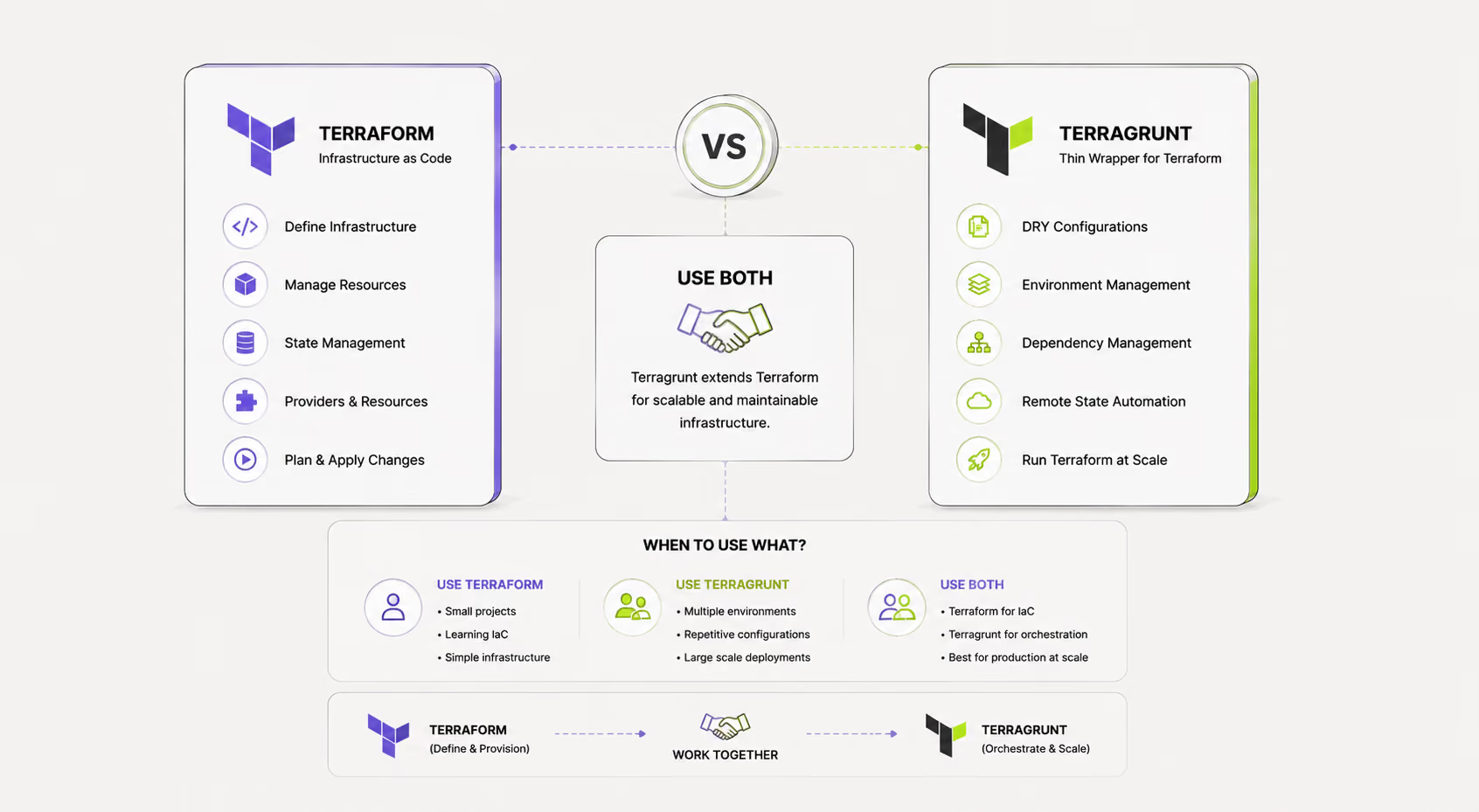

If you've worked with Terraform at scale, you've hit the wall: duplicated backend blocks across every environment, module calls that differ by a single variable, and a sprawling repo where changing one global default means editing twenty files. Terragrunt exists precisely to remove this friction.
But Terragrunt isn't for everyone. A solo developer spinning up a single-environment side project doesn't need it. A 40-engineer platform team managing six AWS accounts and three environments per service almost certainly does. This guide helps you figure out which side of that line you're on — and what to do when the answer is "somewhere in the middle."
1. What Problem Does Terragrunt Solve?
Terraform is excellent at what it's designed to do: declare infrastructure resources and manage their lifecycle. What it isn't designed for is managing many instances of the same infrastructure across multiple environments, accounts, or regions without repeating yourself.
In plain Terraform, every root module that manages remote state needs its own backend configuration. Every environment needs its own copy of provider configuration. There's no native way to inherit shared settings or compose configurations hierarchically. The result is a pattern engineers call "copy-paste infrastructure" — dozens of near-identical main.tf files that differ only in the value of a few variables.
Terragrunt is what you build when you've maintained a 200-module Terraform repo and realized the tooling wasn't designed for that reality.
Terragrunt addresses this with a set of core features:
• Hierarchical configuration — Define common settings once in a root terragrunt.hcl and inherit them in child modules via find_in_parent_folders().
• DRY backend configuration — Generate backend blocks dynamically from variables rather than hard-coding them per module.
• Explicit dependency management — Declare that Module B depends on Module A, so Terragrunt can plan and apply them in the right order.
• Run-all commands — Apply or destroy all modules in a directory tree in dependency order with one command.
• Hooks — Run scripts before or after Terraform operations (e.g., validate inputs, notify Slack on destroy).
💡
Terragrunt is not a replacement for Terraform — it's a thin orchestration wrapper that calls Terraform under the hood. Every "terragrunt apply" still runs "terraform apply". Your state files, providers, and modules stay unchanged.
2. DRY Configurations Compared
The most immediate benefit Terragrunt provides is eliminating repeated backend and provider boilerplate. Here's how the same pattern looks with and without it.
Native Terraform: repeated backend blocks
In a typical multi-environment Terraform repo, every module has its own backend configuration:
Change the bucket name or region and you're editing every single one of these files. Miss one and you're debugging a silent state corruption hours later.
Terragrunt: generate it once
The path_relative_to_include() function automatically generates the correct state key for each module directory. Add a new environment by creating a new directory — no copy-pasting, no backend to configure.
3. Dependency Management
In pure Terraform, dependencies across root modules must be handled manually. If your eks module needs the VPC ID from your networking module, you have two options: hard-code the value, or look it up from the remote state file using a terraform_remote_state data source. Both approaches create fragility.
Terragrunt's dependency block
The dependency block tells Terragrunt: "before applying this module, ensure the networking module has been applied, and read its outputs." When you run terragrunt run-all apply from the environment root, Terragrunt builds a DAG of all modules, resolves the order, and applies them in parallel where possible.
✅
Mock outputs allow CI to run plan on modules whose dependencies haven't been applied yet. This keeps your pull request pipelines fast without needing a full environment provisioned.
To achieve the same thing in native Terraform, you'd need to use a terraform_remote_state data source, a separate orchestration layer like a Makefile, or Terraform Cloud's workspace-to-workspace references (which requires TFC). None of these are as ergonomic as Terragrunt's explicit dependency block.
4. Terragrunt vs Terraform Cloud
Terraform Cloud (TFC) and Terraform Enterprise (TFE) are HashiCorp's managed platforms for running Terraform at scale. They solve some of the same problems as Terragrunt — but through a different lens.
Key insight: Terraform Cloud and Terragrunt are not mutually exclusive. Many large teams use both — Terragrunt for DRY local configuration, and a platform like env zero or TFC for remote execution, RBAC, and audit logging. The two tools operate at different layers of the stack.
⚠️
TFC's workspace-to-workspace run triggers (available on Plus plan) offer dependency chaining, but they're workspace-level — not module-level. For teams with fine-grained module decomposition, Terragrunt's DAG-based run-all remains more flexible.
5. Terraform Workspaces vs Terragrunt
Terraform workspaces are one of the most frequently misused features in the ecosystem. They're often marketed as the solution to "I need dev, staging, and prod environments" — but they have significant limitations at scale.
What workspaces actually do
Workspaces partition state within a single backend configuration. Running terraform workspace new staging creates a separate state file at a different key path. The code remains identical; you control environment differences through terraform.workspace interpolation and tfvars files.
The limitations
This works until you have 8 environments with 40 differing parameters. Then the locals block becomes a maintenance nightmare, and a terraform plan in one workspace can see all the configuration for every other workspace. There's no true isolation.
How Terragrunt handles environments
directory structure
Blast radius is naturally contained. Applying changes to prod/eks only touches prod's state. No workspace switching, no risk of running apply in the wrong workspace context.
📌
Rule of thumb: Use workspaces for short-lived, functionally identical environments (e.g., per-PR preview environments). Use Terragrunt's directory structure for persistent environments with meaningfully different configurations (dev vs prod).
6. Multi-Account Deployments
AWS multi-account architecture — where dev, staging, prod, security, and logging live in separate AWS accounts — is now considered best practice for enterprise workloads. It also makes naive Terraform usage deeply painful.
Terragrunt's approach: generate provider configs
Each module directory inherits the correct provider configuration for its account without any duplication. Adding a sixth AWS account means adding a new directory and an account.hcl file — not editing a dozen provider files.
The four-step pattern:
1. Define account metadata — Each account folder has an account.hcl with its ID, name, and region.
2. Generate providers dynamically — Root terragrunt.hcl uses the generate block to create provider.tf with the right assume-role ARN for each account.
3. Isolate state per account — Remote state keys are namespaced by account and module path. No cross-account state contamination.
4. Run-all across accounts — From the repo root, terragrunt run-all plan can report drift across all accounts in one command.
7. Performance
Performance is nuanced here because it depends heavily on what you're measuring.
Per-module operation speed
Terragrunt adds negligible overhead per module — it calls Terraform directly, and the HCL parsing Terragrunt does before handing off is measured in milliseconds. If you're running a single module, you will not notice the difference.
Parallelism at the repo level
This is where Terragrunt wins decisively. terragrunt run-all apply builds a DAG and applies independent modules in parallel, up to a configurable concurrency limit.
Init caching
Terragrunt caches provider downloads and module sources in .terragrunt-cache. In CI environments with warm caches, this materially reduces init time — especially relevant for large repos with many modules that share providers.
⚠️
Cache gotcha: The .terragrunt-cache directory can grow large in CI. Configure your pipeline to either prune it between runs or cache it with a hash of your lockfile.
8. Team Size Considerations
The decision between vanilla Terraform and Terragrunt correlates strongly with team and infrastructure size. Here's a framework for thinking through the decision:
The "I'll add it later" trap
The most common mistake teams make is deciding to add Terragrunt "when we need it" — and then facing a painful migration when the repo is already large. The signal to add Terragrunt proactively is:
You are about to create a second environment or a second AWS account. That's the point at which the DRY benefits compound and the migration is still small.
Learning curve reality check
Terragrunt's HCL is very similar to Terraform's, but the mental model is different. Budget 1–2 days for an experienced Terraform engineer to become productive with Terragrunt, and 3–5 days to architect a well-structured Terragrunt repo from scratch.
9. env zero Support for Both
env zero fully supports both Terraform and Terragrunt, and handles the nuances of each natively.
Terraform on env0
env zero treats each Terraform root module as a workspace. You get remote plan/apply execution, RBAC, drift detection, cost estimation, and audit logs — all without managing your own runners.
Terragrunt on env0
• Sub-module detection — env zero can discover all terragrunt.hcl files in your repo and create workspaces for each automatically.
• Dependency-aware runs — When Terragrunt modules have explicit dependency blocks, env zero respects the ordering and runs them in the right sequence.
• run-all support — You can trigger run-all apply scoped to a subset of your directory tree via env0's UI or API.
• Version management — Pin Terragrunt and Terraform versions independently per project or globally.
• RBAC on Terragrunt environments — Grant teams access only to the accounts and environments relevant to them, even within a monorepo.
✅
Teams using env zero with Terragrunt can get the DRY code benefits of Terragrunt AND the UI, audit trail, and policy enforcement of a managed platform — without these being mutually exclusive.
The Decision in Three Lines
5. Use Terraform alone if you have a small team, a single account, and fewer than 20 modules.
6. Add Terragrunt when you're about to create a second environment or account — before the copy-paste debt accumulates.
7. Use both with env0 to get DRY configuration, dependency management, remote execution, RBAC, and audit logs in one stack.
Putting It Together
Terraform and Terragrunt aren't competing philosophies — they're tools operating at different layers of the same problem. Terraform handles the hard work of resource lifecycle management, provider APIs, and state. Terragrunt handles the organizational overhead of managing many instances of that work across environments, accounts, and teams.
The teams that thrive with IaC at scale tend to converge on a similar pattern: well-structured Terraform modules (kept small and single-purpose), Terragrunt to compose and configure those modules across environments, and a platform layer for execution, visibility, and guardrails.
The most important thing isn't picking the "right" tool on day one. It's building with enough structure that adding Terragrunt later isn't a catastrophic refactor. Keep your modules small, avoid putting environment logic in module code, and isolate state per environment from the start.


.avif)