.svg)

Many Enterprise customers have a workflow approval process already in place with tools like ServiceNow. Today, I wanted to show you how you can quickly take advantage of your existing ITSM tooling, and business processes - while enabling self-service infrastructure provisioning with env0.
Pre-Requisites
- ServiceNow - Outbound Rest Integration
- env zero Organization
- env zero API Key
Overview
The purpose of this guide is to show the possibilities of integrating ServiceNow with env zero to create an env zero Environment through the ServiceNow Catalog.
Outbound Rest Integration
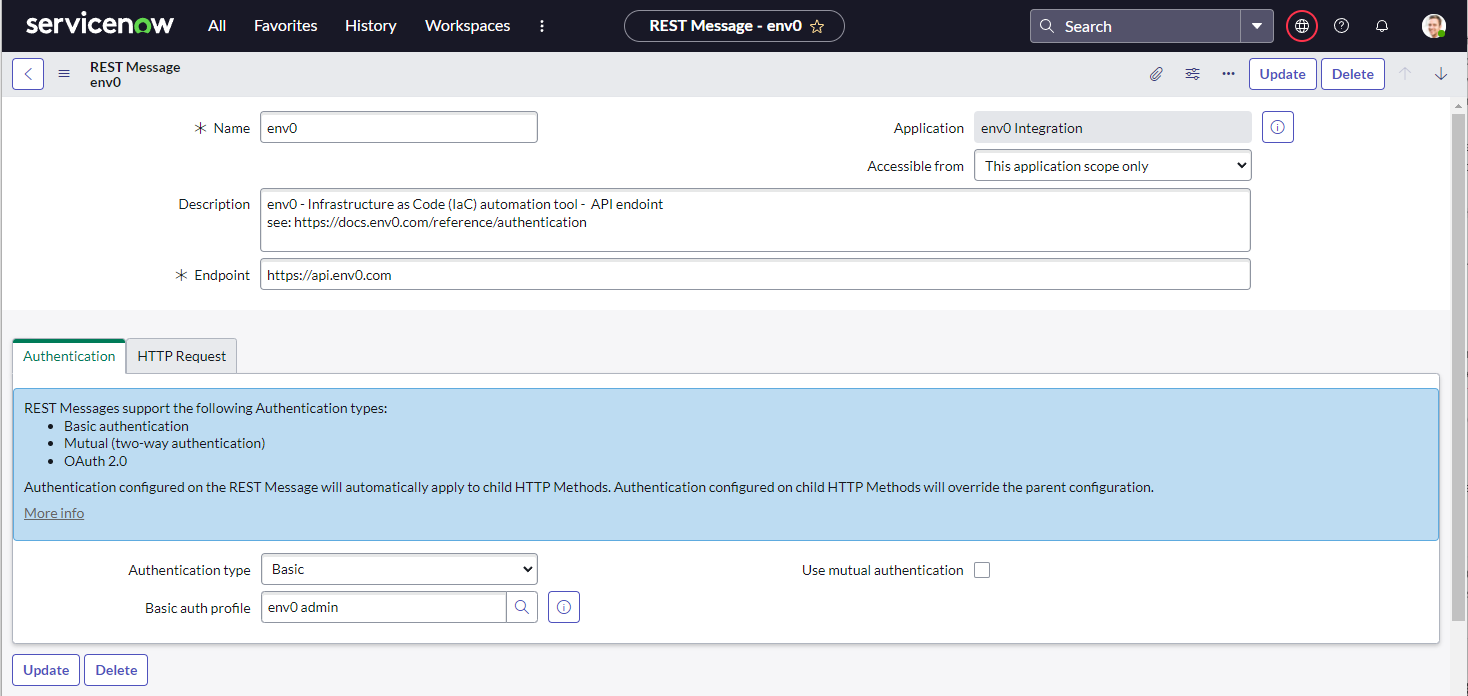
First, we are going to create a new REST Message Record.
We are going to take advantage of ServiceNow’s outbound REST integration and env0’s API.
In ServiceNow, search for “REST Message” and create a “New” record.

Name: env0
Endpoint: https://api.envzero.com
Authentication type: “Basic”
and add a new Basic auth profile. You can retrieve the API key from env zero (https://app.envzero.com/organizations/ under the “API KEYS” tab)
Hit “submit”
Next, we are going to create a new HTTP Method to create the desired environment.
Click on the “env0” Rest Message you just created and Create a “New” HTTP Methods

Name: Create Environment
HTTP method: POST
Endoint: https://api.envzero.com/environments
Authentication: Inherit from parent
HTTP Request:
- callout: You will need to modify the “configurationChanges” based on your env zero environment variables required.
- callout: I’m using several variables that will get replaced during the execution of the script.
Lastly, we are going to copy the Preview Script Usage.
Click on the Preview Script Usage, and make a copy of the script, we will use it later.
- Note: if you want to test the API key you can create another HTTP Method that queries the organization: https://docs.envzero.com/reference/organization-find-organization-by-id
Create a Business Rule.
I’m going to assume you know how to create a ServiceNow catalog item, and that you’ve created a catalog item for the env zero environment you want to create.
So the most important step is to trigger the env zero deployment when a new catalog item is being requested.
For that we will use ServiceNow Business Rule to detect when a catalog item has been Requested.
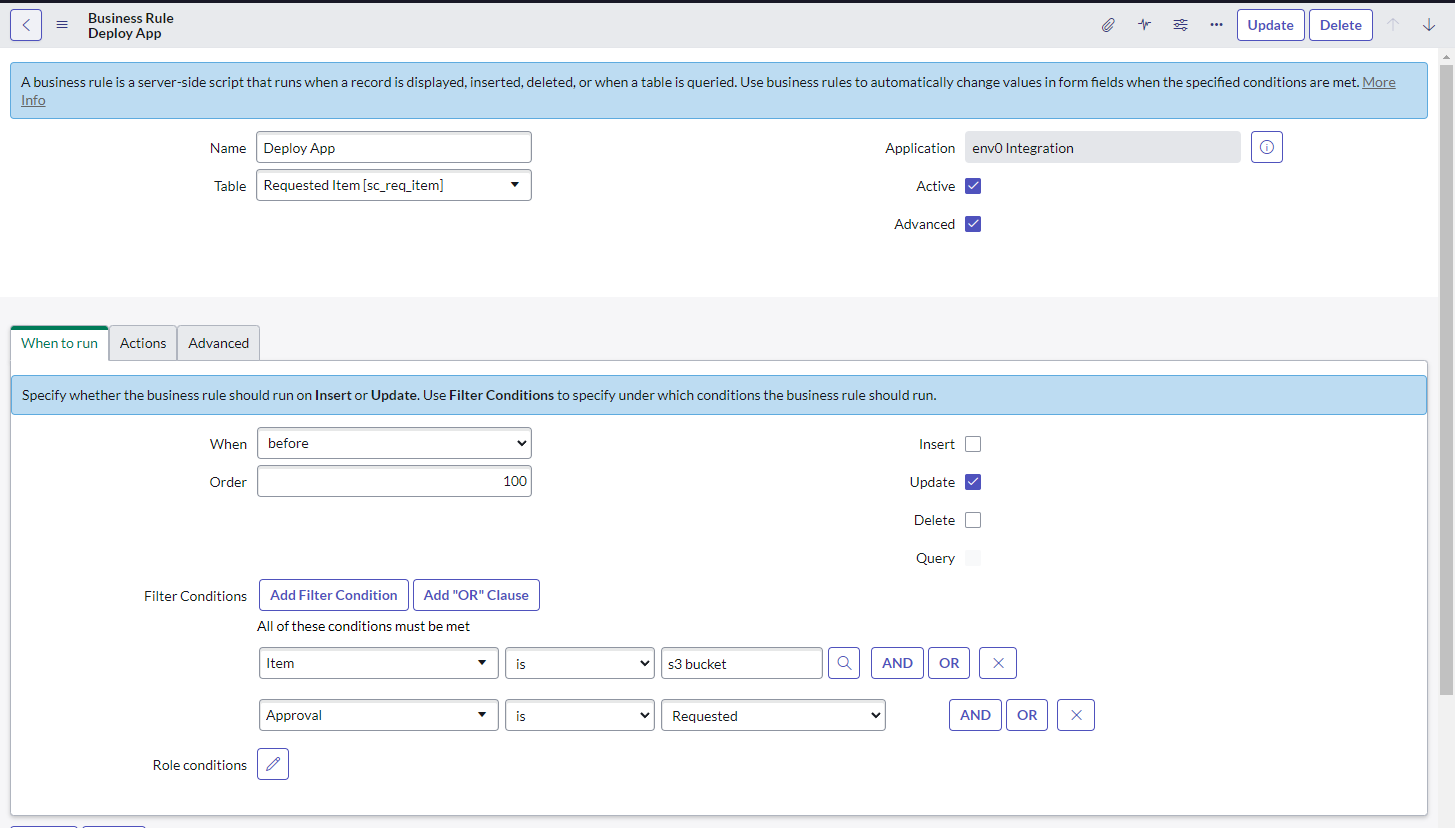
Advanced:
We will paste in the script we copied from above.
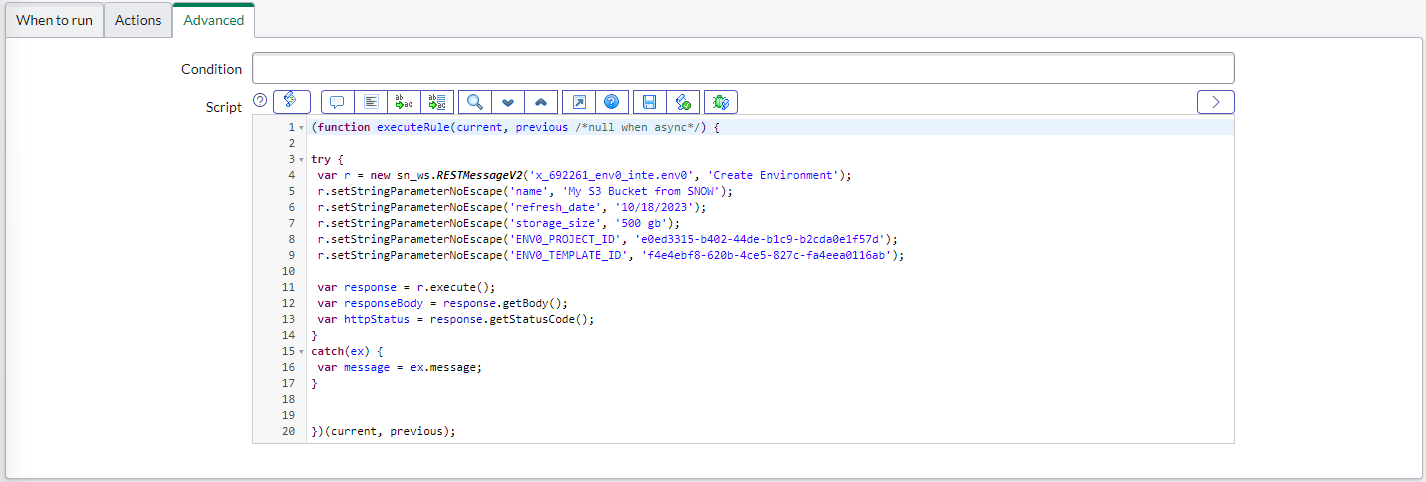
Voila!
Now request a new S3 Bucket from the Service Catalog, and watch the deployment trigger in env0.
Next Steps:
- Send Plan details back to ServiceNow for review
- Request Approval Process in ServiceNow
- Send Approval to env zero to deploy
- Update ServiceNow Request with Status provisioned

Related Content

The Full Picture of Cloud Cost Control: How Infracost, env zero, and CloudQuery Close the Loop for Platform Teams


Top IaC Challenges - Extensibility and Integrations


Top 4 Terraform Plugins to Integrate with your Infrastructure-as-Code Workflow in 2023