
.svg)


It seems like everyone on the web is moving to Continuous Deployment these days, and for good reason. With a Continuous Deployment flow in place, less time is spent worrying about releasing code, and more time is spent on creating new features or fixing bugs. The fast flow of delivery also helps with quick feedback from users, and the speed of delivering fixes when necessary.
While setting up your CD pipeline can seem complicated, with a new generation of tools it’s actually gotten a lot more simple. For this guide, I’ll show you how to set up an easy CD pipeline using env0, which provides an easy way of continuously deploying your Terraform code, with minimal effort. I’ll also be using GitHub to manage my sample code, which will be deployed on AWS.
In fact, this process is so simple, that there’s really just one step after you’ve completed your setup of env0. If you’d like to try it out for yourself, all you need is:
- An envzero account (It’s free! Just join here)
- A GitHub account
- An AWS account
Let’s get to it
envzero Basic Setup
As a first step, I followed env0’s getting started guide to create my own organization, connect my AWS account, and create a template for my terraform code.
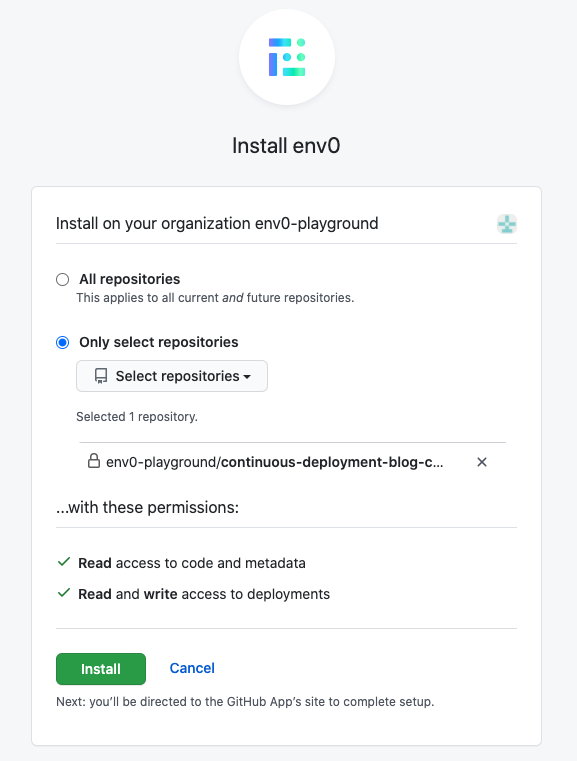
When creating the template, I also installed the envzero GitHub App, and allowed it to access my GitHub repository.
Triggering Deploys on New Commits
Now we just need to create an environment using the template we have created, and tell envzero to continuously deploy on push events to the git repo.
Simply go to the Project Templates page, and click “Run now” on the template that we’ve created. In the next screen you will need to do the following:
- Pick the branch you would like to continuously deploy, under the “Revision” field. I picked the master branch
- Check the “Redeploy on every push to the git branch” checkbox
- Click on “Run”

Your environment is now deploying! When it’s done, you can go to the “resources” tab to get the “website_endpoint” from our terraform code’s output, and check that our website is up and running.
And we’re done!

Now, let’s check if the environment will really deploy on push to master. Let’s create a Pull Request and add a new S3 bucket hosting another html file. We can accomplish this by:
- Creating a `new.index.html` file, with the new content we want to host
- Adding the following code to `main.tf`:
module “my_new_website” {
source = “./my-website-bucket”
name = “env0.my-new-website.cd.blog.com”
html_file_source = “new.index.html”
}
output “my_new_website_endpoint” {
value = module.my_new_website.website_endpoint
}
After we’re done, let’s merge the Pull Request and go to envzero and see the new deployment


Viola! Our terraform file changes were applied successfully, and a new S3 bucket was created hosting our new html file

Learn more
envzero is a complete environment-as-a-service solution. Our continuous deployment solution is only one way in which envzero lets you automate your Terraform code. Continuously deploying your code in envzero gives you tools to govern your environment. For example:
- Complete history - envzero provides you with audit logs on each action that happened on your environment, both on manual and automated ones
- Cost monitoring - view cost over time for your environment, and correlate how deployments affect the cost of your environment
- Role based access - Managing your environments through envzero allows you to have full control over who has permissions to plan/apply your terraform code
You’re welcome to check out our docs about continuous deployment, or if you’d like, just reach out or schedule a demo with us!

Related Content

Accelerated Migration from HCP Terraform (Terraform Cloud) with env zero Migration Wizard
.avif)
Why Western Union chose env zero to manage Infrastructure-as-Code at scale, with confidence

Which IaC Scanning Tool is the Best?: Comparing Checkov vs tfsec vs Terrascan

Full SCIM Provisioning: Group changes now reach env zero without waiting for a login


Terraform Bulk Import: Finding Unmanaged Resources at Scale