Hello again, envzero fans! Today is an awesome day for our GitLab and Bitbucket users. That’s right, it’s new button day! TWO new buttons day, to be exact! So, it’s time to ask the greatest question in tech… What does this button do?
New VCS Integrations
We are happy to announce that we now have VCS integration available natively in the platform for GitLab.com and BitBucket.org!
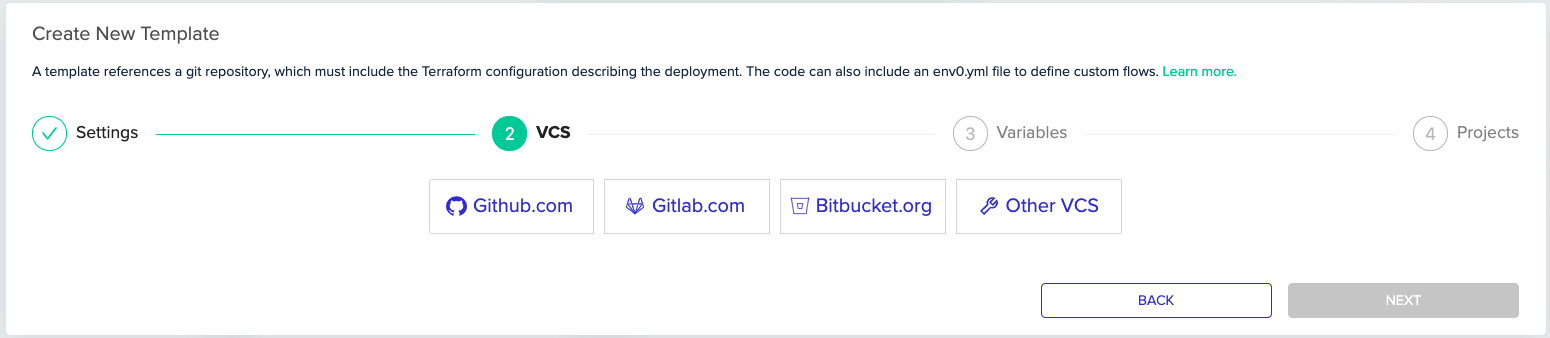
Up until now, if you were using GitLab.com or Bitbucket.org for VCS, you had to use the “Other VCS” option, give us your repo’s URL, and make sure you had a Git Token configured. That is all a thing of the past now. If you have not used our GitHub.com integration before, let’s take a look at the easy process to set up the integration.
GitLab.com
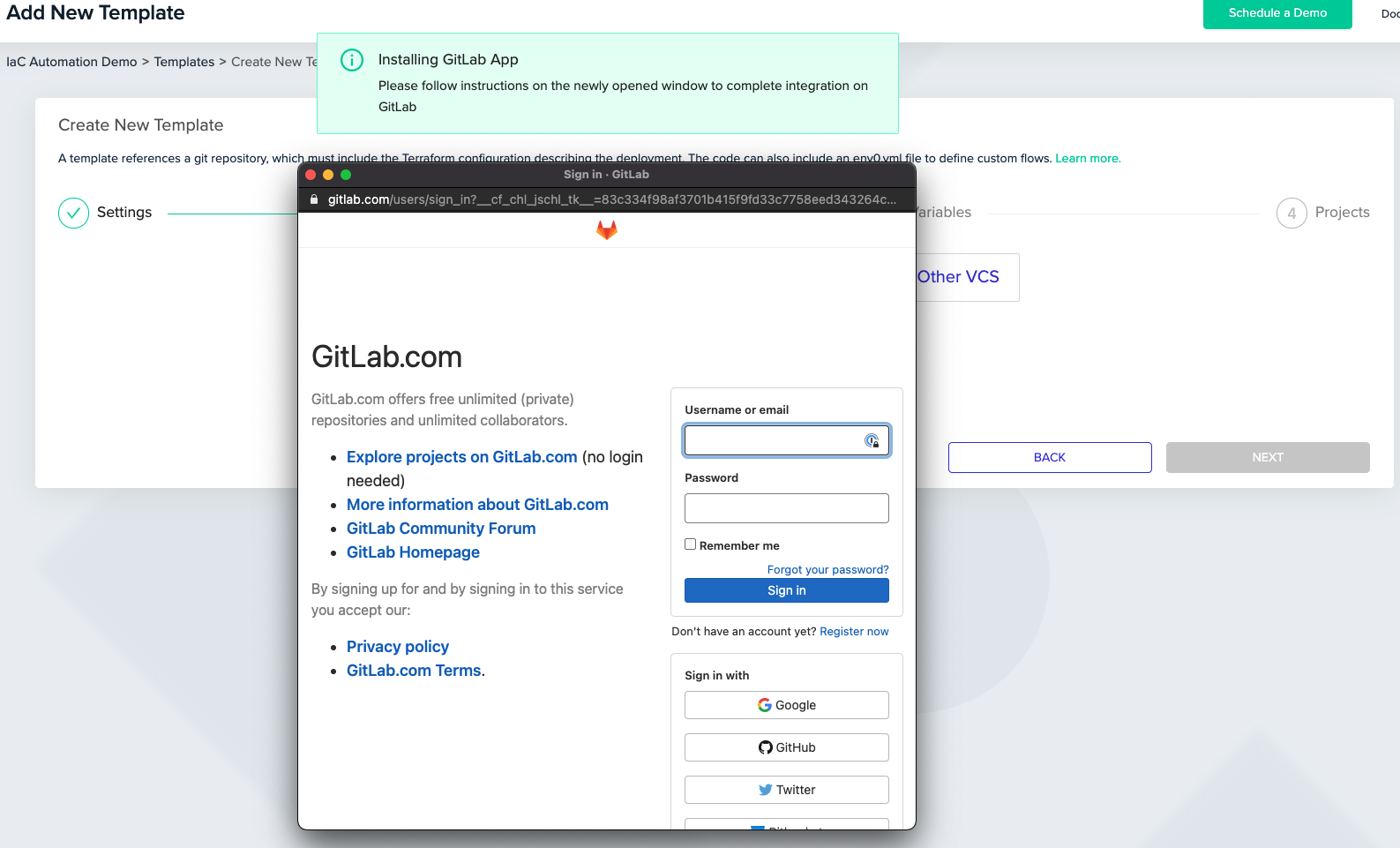
When you first hit the button, you’re going to get a popup asking you to authenticate to the GitLab.com platform and will walk you through the authorization. This is so we can set up the authentication and webhook connection.
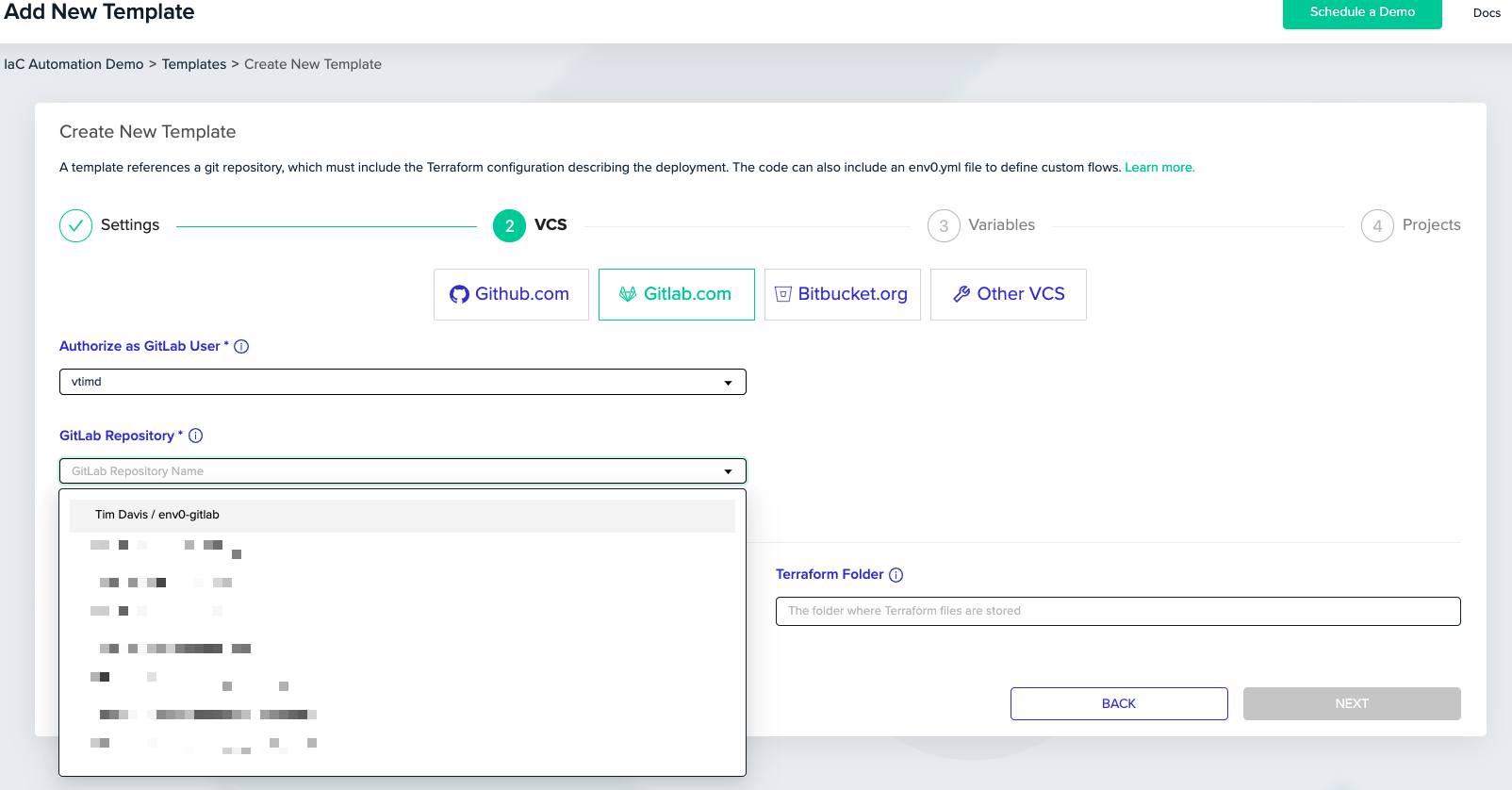
Once you’ve done authorized, you’re good to go! You can now see all your repo’s and continue the Template Wizard as you normally would. Easy mode.
Bitbucket.org
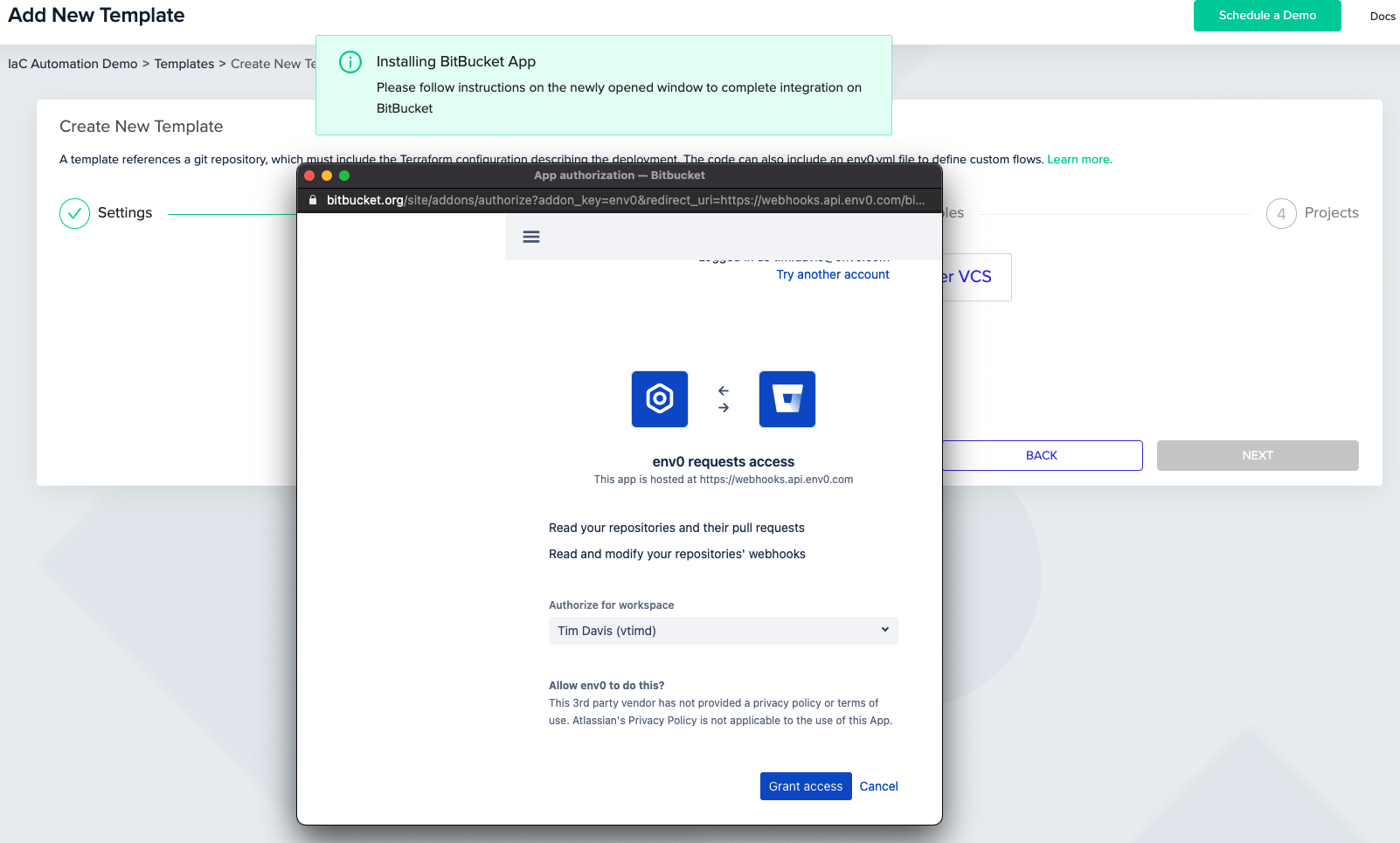
This one is going to look very similar. NOTE: If you have not enabled Development Access in your Bitbucket account, you’ll be prompted to in the popup before you are allowed to click Grant Access. From here, you just need to login and click Grant Access so that we can set up the connection.
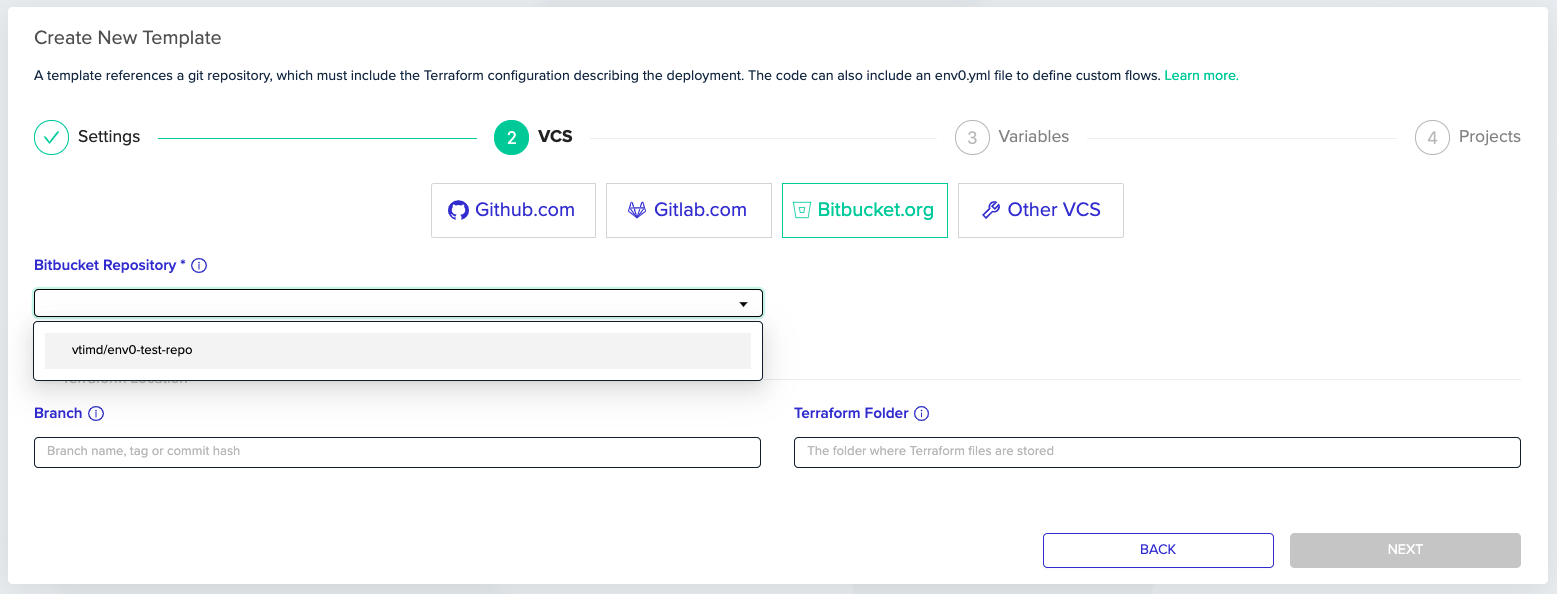
When that is complete, you’re off to the races! You’ll now have the ability to quickly and easily find and select your repo that you want to create the template from.
As always, please feel free to reach out to us if you find any issues, or want to request some other type of integration or feature. We’re here to make your IaC deployments as easy as possible.

Related Content

Today we're launching the env zero Free Tier, a free-forever plan that gives platform teams the full env zero orchestration experience rather than a locked-down demo of it. If you've been waiting for a way to try real IaC orchestration on your own terms, this is your front door.
Why we built the env zero Free Tier
Platform engineering is a bottom-up discipline. You don't adopt a new IaC platform because someone signed a contract. You adopt it because you spun it up on a Friday, pointed it at a repo, and saw it solve the orchestration and self-service problems you live with every day.
For too long, trying env zero meant talking to us first, and that's the wrong answer to "I just want to see if this works for my team." So we changed it. The Free Tier is self-serve from the first click. Create an org, connect your VCS, and run.
With the IaC landscape shifting and long-standing free options disappearing, a lot of teams are re-evaluating how they orchestrate Terraform and OpenTofu right now. We wanted env zero to be the obvious place to land. We looked hard at the competitive landscape and sought to include a feature and entitlements set that would make env zero the superior option.
Who it's for
The Free Tier is built for the platform engineer standing up self-service infrastructure for their org, whether that's a solo practitioner proving out a workflow or a small platform team giving developers a paved road to deploy on.
It's a fit if you want to:
- Give your developers self-service environments without handing them the keys to production
- Run drift detection against your live infrastructure so state surprises stop being surprises
- Wire in SSO and bring your whole team in from day one, not just yourself and one teammate
- Orchestrate Terraform and OpenTofu with real guardrails, before you've had a single procurement conversation
What you get
The Free Tier ships with the complete env zero Navigator feature set. We took the position early that a paying customer should never receive less than a free user does, so instead of carving out a feature-limited "lite" plan, we gave the free tier the full product and set generous usage limits around it.
| Price | $0, in perpetuity |
|---|---|
| Runs | 250 / month |
| Environments | Up to 30 |
| Deploying users | Unlimited, humans and agents |
| Features | Full Navigator feature set, including drift detection and OIDC SSO |
| Support | Community support |
A few things worth spelling out for the way platform teams actually work:
A "run" is an outcome. One run equals one successful apply or one drift detection. Plans and failed runs don't burn your monthly allowance, so you're only metered on work that actually happened.
Unlimited users, including agents. There's no per-seat gate and no "invite two people, then pay." Bring your whole platform team and your automation. As IaC pipelines increasingly include non-human actors, we didn't want a seat cap to be the thing that boxed you in.
Drift detection and SSO are included. These are the capabilities teams usually have to upgrade to reach elsewhere. On env zero they're part of the free experience, because they're part of running infrastructure responsibly.
Where the limits are, and what's next
The Free Tier is designed to run real workloads, not just a hello-world. The two dials that define it are 250 runs per month and 30 environments. When your team consistently pushes past those, that's the natural signal you've outgrown free. Our paid tiers, Cloud Navigator and Cloud Pilot, lift those ceilings and add direct support and more advanced capabilities as you scale.
There's no downgrade trap and no bait-and-switch. Free stays free, and the path up is there when you need it and not before.
Get started
You can be deploying in minutes:
- Sign up for env zero. Every new self-serve account lands on the Free Tier automatically.
- Connect your VCS and point env zero at an IaC repo.
- Run your first deployment, turn on drift detection, and invite your team.
No trial countdown. No credit card. No gatekeeper.
FAQ
Is it really free forever? Yes. The Free Tier is $0 in perpetuity. It isn't a promotional rate or a countdown to a paid plan.
Is there a trial? Do I need a credit card? No trial and no credit card. Every new self-serve account lands directly on the Free Tier, so you start on Free from your very first login and stay there. There's no trial period to expire and nothing that quietly downgrades on you later.
What counts as a run? A run is one successful apply or one drift detection. Plans and failed runs don't count against your monthly total, so you're only ever metered on work that completed.
What happens when I hit 250 runs or 30 environments? Those are the two limits that define the Free Tier. When you reach a cap, env zero lets you know and shows you the path to more capacity through Cloud Navigator or Cloud Pilot. Your existing environments and configuration stay intact.
Do I get fewer features on Free than on a paid plan? No. The Free Tier includes the complete Navigator feature set, drift detection and OIDC SSO included. The paid tiers raise your usage limits and add direct support and more advanced capabilities as you scale, rather than unlocking basic functionality.
Can I add my whole team? Yes. Deploying users are unlimited on Free, both human teammates and automation or agents. There's no per-seat charge.
What support is included? Free Tier comes with community support. Direct support is part of the Cloud Navigator and Cloud Pilot tiers. Paid support plans are available for Free Tier users, simply Contact Us.
How do I upgrade when I outgrow Free? When your team consistently pushes past the run or environment limits, you can move up to Cloud Navigator or Cloud Pilot for higher ceilings, direct support, and additional capabilities. Your work carries over.
Introducing the env zero Free Tier: full-featured IaC orchestration, free forever

The new env zero Agent CLI is available now. Ask your coding agent about your infrastructure in plain English, and it answers from real state, inside the same roles, approvals, and audit trail your team already runs on.
Important Note:Â The old CLI, the Node package@env0/cliversion 1.x, is deprecated. The current CLI is a single binary and is the recommended way to use env zero from the terminal. Pin@env0/cli@^1to stay on the old one while you migrate.
Today we are launching the Agentic Experience (AX) on env zero, powered by the new env zero Agent CLI. The idea is simple. You point your coding agent, whether that is Claude Code, Cursor, Codex, or Copilot, at your env zero infrastructure, ask it a question in plain English, and it answers from your real environments, deployments, and drift instead of guessing. It is available to every account starting now.
Coding agents are already inside your workflow. They read your codebase, propose changes, and increasingly get asked to do the work rather than describe it. The open question is what they are plugged into when they try. Point one at your infrastructure today and, on most platforms, it sees a thin slice of current state, fills the gaps with guesses, and burns tokens scraping an API that was never meant for a machine to reason over. It can talk about your infrastructure. It cannot reliably operate it.
The Agent CLI changes what the agent is standing on. It gives your agent the full picture, every environment, module, template, plan, and the deployment history behind them, in a form built for a context window instead of a browser tab. Ask a question, and the agent reads real state to answer it. Ask for a change, and it acts through the same roles and approvals a person would. The commands in this post are the plumbing. The product is the conversation on top of them.
Ask your infrastructure a question
Here is what the Agentic Experience looks like in practice. Each example is a prompt an engineer types to their agent. Underneath each one is the command the agent actually runs, the receipt for what it did. You never have to type the command yourself.
"Why did payments-staging go red? Is it our change or drift?"
The agent pulls the environment's full context, its state, recent deployments, and a drift or failure summary, in a single request, then tells you whether the failure traces to your last deploy or to something that changed underneath it.
env0 context payments-staging‍
"Before I merge this, plan the change against prod and tell me if anything gets replaced."
The agent starts an approval-gated deployment, so the plan runs but nothing applies without a human. It reads the plan, flags any resource that would be replaced rather than updated, and leaves the change waiting for your sign-off.
env0 environment deploy prod --requires-approval‍
"Which environments in data-platform haven't deployed in 30 days, and what are they costing us?"
The agent lists every environment in the project as structured data, filters by last deployment date, and adds up the cost estimates, so you get the stale environments and their spend in one answer.
env0 environment list --project data-platform -o json‍
"Anything waiting on my approval? Summarize what each one changes."
The agent finds the deployments paused at an approval gate, reads each plan, and gives you a one-line summary of what every pending change would do before you approve or cancel it.
env0 deployment list -o json‍
None of these require you to know the commands, and that is the point. The Agent CLI hands the agent structured JSON on stdout, errors on stderr, and stable exit codes, so it can chain reads and actions and know exactly what happened at each step without you translating between English and the API.
Governance that already applies to agents
This is the part security teams care about, and it works today.
An agent on the Agent CLI is not a special case that sits outside your controls. It authenticates as a real env zero identity, per user through the browser or per service through an API key, never a shared token, so every read and every action is attributable to someone rather than fired anonymously.
Because your existing role-based access control applies to that identity, you decide what the agent can do simply by choosing the identity you give it. Hand it a read-scoped identity and you get an agent that can diagnose anything and change nothing. It can pull context, list environments, and read plans and logs, while deploy, destroy, and approve are not available to it at all. Give it a broader identity and the approval gates still hold. A deployment that requires approval pauses for a human no matter who or what started it, and destroying infrastructure still takes an explicit confirmation.
So the safe pattern is available now, with no new product to adopt. A read-only agent that investigates and explains, a human in the loop for anything that changes infrastructure, and a full audit trail, because the agent acted as itself and not as a key nobody can trace.
The skill is the seed of your agent operating policy
Getting an agent set up is one command.
env0 skill install‍
‍
That writes a usage guide into your coding agent's config so it knows the exact commands, flags, and output formats for the version of the Agent CLI you have installed. It sets up Claude Code by default, with --agent cursor, --agent codex, or --agent copilot for the others.
Two things about that guide matter more than they first appear.
It is version-matched. The agent works from the command surface you actually have, not one it half-remembers from training. Invented flags are the fastest way for an agent to lose an engineer's trust on infrastructure, and a version-matched guide is how you keep them out.
And it is a file in your repository, not a hosted black box. You commit it, and you extend it. Add your own conventions on top: the golden-path templates a new environment should start from, a rule that no agent touches prod without approval, a list of projects that are off limits. Once it is committed, every agent that every engineer runs inherits the same operating manual, and it gets reviewed in a pull request like any other code. You are not just installing a skill. You are planting the seed of your team's agent operating policy, in version control, where it belongs.
Why it goes deeper than an API wrapper
A generic CLI wrapped around an API is only as good as the API underneath it. env zero already understands your environments, your modules, your deployment history, and how they connect, and the Agent CLI is built on that understanding rather than layered over it.
The clearest example is env0 context. It returns an environment's state, recent deployments, and drift or failure summary in a single call, so an agent diagnoses a broken deployment in one request instead of stitching the picture together across several. Fewer round trips, less context spent, and an answer grounded in real state.
It also clears the three obstacles we heard about from nearly every team that tried to put agent access in front of a platform. Security teams distrusted a shared, unattributable credential. One enterprise customer's security team blocked our old MCP server outright and started patching around the credential model before they ever raised it with us. Setup was a wall. As one account team put it while describing the self-hosted container, four out of five customers got stuck standing it up. And even where it worked, the surface underneath was thin, showing the latest deployment only, with no history. The Agent CLI answers all three. There is no container to stand up, a real per-identity login replaces the shared token, and the surface is deep enough that an agent never has to fall back to the raw API for context.
The old MCP server keeps working for existing integrations, but new agent capability lands in the Agent CLI now. That is where the Agentic Experience lives going forward.
What's in this release
- Point Claude Code, Cursor, Codex, or Copilot at env zero and ask about your infrastructure in plain English
- Read across environments, deployments, projects, templates, and plans, including full history
- Diagnose a failed environment (state, recent deployments, and drift) in a single env0 context call
- Run core actions when you allow it: create, deploy, destroy, approve, cancel, abort
- Scope agents with your existing roles and approvals, with every action attributable to a real identity
- See cost estimates alongside your reads
- Install a version-matched, extensible skill for your agent with one command
What comes next
Today you scope an agent by choosing the identity you give it. Next, we are making read-only the default for agents regardless of the human behind them, with write access as an explicit, audited step someone has to grant. An engineer with full permissions still gets a read-only agent unless they deliberately elevate it.
We are also expanding what an agent can see, starting with policy and governance configuration, so it can read the guardrails a project runs under and not just its deployments, and we are widening the read surface from there.
The goal has not changed. Give an agent enough real context to be useful, and never more access than it has earned.
Get started today
The env zero Agent CLI is available now. Install it with Homebrew or npm:
brew install env0/tap/env0‍
- Sign in with:
env0 login‍ - Run and setup your agent with:Â
env0 skill install - Ask your first question
The full env zero Agent CLI documentation covers every command, flag, and output format.
Want a walkthrough? Schedule a technical demo to see the Agentic Experience in action.
FAQ
What is the env zero Agentic Experience? It is the ability to point a coding agent, such as Claude Code, Cursor, Codex, or Copilot, at your env zero infrastructure and work with it in plain English. The agent answers from your real environments, deployments, and drift, and can take action through the same roles and approvals a person would. It is powered by the new env zero Agent CLI, available now.
How is this different from the old MCP server? The MCP server needed a self-hosted container and a single shared credential, and it only ever saw the latest deployment. The Agent CLI installs directly as a single binary, authenticates per user or per service account, reads the full history and diagnosis surface, and returns structured output an agent can parse without extra tooling. The MCP server keeps working for existing integrations, but new agent capability lands in the Agent CLI.
Can I stop an agent from changing infrastructure? Yes, today. An agent authenticates as a real env zero identity and inherits that identity's role. Give it a read-scoped identity and it can diagnose but not deploy, destroy, or approve. Even with a broader identity, approval gates still pause changes for a human, and every action is recorded against the identity that ran it.
What exactly does the skill do? env0 skill install writes a version-matched usage guide into your agent's config so it knows the real commands and flags for the CLI you have installed, which keeps it from inventing them. Because the guide is a file in your repository, you can commit it and extend it with your own conventions, so every engineer's agent inherits the same rules.
What is on the roadmap? Read-only-by-default access for agents regardless of the human behind them, with an explicit, audited path to write access, broader policy and governance visibility in the CLI, and continued expansion of the read surface.
Get started: install the env zero Agent CLI or read the docs
‍
Announcing the env zero Agentic Experience: Point Your Coding Agent at Your Infrastructure


Important Note:Â@env0/cliversion 1.x, is deprecated. The current CLI is a single binary and is the recommended way to use env zero from the terminal. Pin@env0/cli@^1to stay on the old one while you migrate. Please see details on the new env zero CLI here.
At envzero we know how important workflows are for developers, which is why we’re excited to announce the brand new envzero CLI! Just like our GUI at envzero.com and our API, you can make use of the features and capabilities of envzero through the CLI to build your own perfect workflow.
Why a CLI? As your system becomes more robust and complex, you may often find yourself working with different service providers and 3rd-parties to assist your dev team. Whether it’s your cloud provider, different security-related solutions or CI/CD platforms, they usually provide you with a decent user interface to handle your requirements and actions. As time goes by, you could find yourself wanting a better degree of automation to your day to day operations. A CLI is a great way to do all this without ever having to change context or even take your hands off the keyboard.
And because we’re big supporters of Open Source and believe in sharing our code with the world, we’re proud to say that our CLI is fully open-sourced. The CLI can be found on GitHub and is published via npm and you’re welcome to leave your feedback and contribute.
Setting Up the CLI
First, we need to verify that NodeJS (a dependency for the CLI) is installed and that we can globally install our package:
npm install -g @env0/cli
// or
yarn global add @env0/cli
After installing the command line tool, we need to head over to the envzero UI to create a new API key and secret for our CLI usage. You can find it under the Organization -> Settings -> API Keys screen.
Now we need to configure the CLI tool with proper settings and secrets using the envzero configure command:

If you aren’t aware of your organization, project and blueprint IDs — don’t worry! Head over to app.envzero.com and follow our walk through to learn about the different entities in the flow.
Now that we have a properly configured CLI, we can run our first deployment using the envzero deploy command, or have our existing environment taken off using the envzero destroy command!
Using the CLI
Once your CLI is set up, you can use it to easily manage your cloud environments from your local machine, while maintaining all the governance and visibility that envzero gives you. What can you do with the CLI?
Deploy/Destroy
Deploy or destroy your environments using
envzero deploy
// or
envzero destroy
And just wait a little to see your live deployment getting updated on your console’s output!

Plan/Approve Plan
Another common practice in the envzero platform is to run your deployment where it’ll wait for an approval before applying actual changes. This flow is also achievable via the new CLI using the - requiresApproval (-a) argument.
envzero deploy -a
// or
envzero destroy -a
Your deployment will halt and wait for approval before continuing. In order to approve or cancel your current environment’s deployment you can use either of the commands:
envzero approve
// or
envzero cancel
For extensive information on how to use the above commands please approach the envzero CLI official README.

Streamlined Deployment Steps Logs
When dealing with deployments, the most interesting view is the console output that shows your deployment logs. On the envzero platform, you already get an organized and detailed view of your deployment logs, divided into predefined steps (i.e git clone, terraform init, terraform plan/apply and etc.)
The envzero CLI keeps the same experience with streamlined deployment steps logs that are sent to your console right away and gives you a live view of your deployment status.

Learn More
Using the envzero CLI lets you and your team enjoy the convenience of a local CLI with all the automation, governance, and visibility that envzero brings for your environments and their deployments. Feel free to test it out and provide us with feedback!
You may also follow our detailed README for a full list of the commands and their available arguments.
You’re more than welcome to check us out on envzero.com. don’t hesitate to reach out if you have any questions or schedule a demo with us if you’re interested to hear more!
Introducing the env zero CLI

Cost visibility without governance is just expensive awareness. Governance without real-time data is just expensive guessing.
The Infracost team published something worth reading: a breakdown of the ten cloud cost anti-patterns that quietly drain infrastructure budgets. These include old EC2 instance families, orphaned test environments, log groups retaining data forever, and multi-AZ replication running in dev because someone copy-pasted a prod config.
Their diagnosis is correct. These aren't careless mistakes. They're reasonable decisions made without cost context at the moment those decisions happen.
But the billing console only tells you what already happened. And a PR-level cost estimate only tells you what's about to happen. Neither one tells you what your infrastructure is costing you right now, across every environment, every team, every account.
That's three separate problems. They need three separate capabilities… working together.
The Three Moments That Matter
Cloud cost control has a timeline, but most teams only address one part of it.
Before deployment: An engineer writes a Terraform module. They pick an instance type, configure a database, set retention policies. Every decision they make has a cost implication. Without visibility at this stage, those implications are invisible until the bill arrives.
At deployment: Code merges. Infrastructure provisions. Policies either enforce standards or they don't. This is the last moment a cost problem is cheap to fix.
After deployment: The environment is live and then configurations drift. New services get adopted without a clear cost model, while test environments survive longer than they should. Costs accumulate quietly, outside any PR, outside any policy review.
Most teams have partial coverage at best. Infracost handles the first moment. env zero handles the second. CloudQuery—now part of env zero—handles the third.
Before You Ship: Infracost + env zero
Infracost surfaces cost estimates in pull requests (and they support more than 10 million SKUs across clouds). An engineer sees that the RDS instance is over-provisioned for a dev workload. They see the monthly delta. The context is there, at the exact moment the fix is a two-minute edit rather than a production change requiring a maintenance window.
env zero extends that context into enforcement. A cost threshold policy blocks the deployment if the estimated spend exceeds a defined limit. A tagging policy requires every environment to carry an owner tag and an expiry date before it merges. A governance workflow routes high-cost changes to a reviewer with authority to approve or reject.
The engineer isn't the last line of defense anymore; the platform is.
Customers using env zero's pre-deployment cost enforcement have cut IaC-related infrastructure spend by 45%. That's not optimization after the fact; that's the problem not happening.
After You Ship: env zero + CloudQuery
Pre-deployment governance catches what you can see before the merge. It doesn't catch what changes after it.
Infrastructure drifts. Engineers provision resources outside the standard pipeline. A test environment spun up six months ago never got an expiry date. A new managed service got adopted without anyone mapping out what it costs at scale. These problems live in your running infrastructure, not in your pull requests.
CloudQuery is now part of env zero. It continuously queries your live cloud infrastructure—across AWS, Azure, and GCP—and surfaces what's actually running, what it's actually costing, and where it deviates from the standards your platform team has defined.
This is the real-time half of cloud cost governance. Not what an engineer estimated before the merge. What your infrastructure is actually spending right now.
The Test Environment Problem, Fully Solved
The Infracost piece calls out the test environment that never got torn down. Every platform engineer has several of these.
env zero handles this at the policy level before deployment: every environment carries a TTL, auto-expiry terminates it on schedule, no engineer has to remember anything.
CloudQuery handles the environments that already exist without those controls. It finds them. It surfaces their running cost. It gives your platform team the data to act on.
Virgin Media O2 went from spending half a day standing up a single POC environment to spinning one up in under 10 minutes with 5 variables. Auto-expiry controls costs automatically. CloudQuery makes sure nothing slips through the cracks of what's already running.
Governance Across the Full Infrastructure Lifecycle
The common thread in every cloud cost anti-pattern Infracost identified: engineers made reasonable decisions without the right context at the right moment.
The fix isn't better finance reviews after the fact, but rather, closing all three gaps before deployment, at deployment, and in production.
Infracost provides cost context in the PR. env zero enforces the policies that make that context binding. CloudQuery, now part of env zero, continuously monitors what's running and surfaces what the enforcement layer didn't catch.
That's not three tools. That's one governance lifecycle from the first line of Terraform to the last running resource.
See how env zero governs the full infrastructure lifecycle →
Learn more about the env zero Infracost integration →
Learn more about CloudQuery →
Related: env0’s AWS integration brings environment management, cost controls, and deployment guardrails to your AWS infrastructure workflows.
The Full Picture of Cloud Cost Control: How Infracost, env zero, and CloudQuery Close the Loop for Platform Teams


Hello, env zero fans! As some of you know, we have almost unlimited extensibility with 3rd party tools, using our custom workflows. You can hook in pretty much any tool, in any phase of the deployment. Today, we’re going to talk about how to prevent cloud misconfigurations before they start. We’re going to do this by chaining a tool in the deployment after the terraform plan phase. This is where our friends at Bridgecrew come in. Just like we at env zero have open-sourced the Terratag module of our platform, Bridgecrew has open-sourced Checkov!
Checkov
Checkov is a static code analysis tool for infrastructure-as-code. It scans cloud infrastructure managed in Terraform, Cloudformation, Kubernetes, Arm templates, or Serverless Framework and detects misconfigurations.

Setup
For illustration purposes, we’re going to use Bridgecrew’s demo application called TerraGoat. TerraGoat is Bridgecrew’s “Vulnerable by Design” Terraform repository. TerraGoat is a learning and training project that demonstrates how common configuration errors can find their way into production cloud environments.
DISCLAIMER: DO NOT ACTUALLY DEPLOY THIS APPLICATION INTO YOUR CLOUD INFRASTRUCTURE. IT IS PURPOSELY COMPROMISED.
I have created a template of TerraGoat inside of env zero and linked it to our Bridgecrew Demo project.

The only other thing we have to do is to actually call Checkov to do the check during the deployment. We need to do this after the Terraform plan phase, so that we have a plan to check. Here is what the env0.yml file will look like:
This adds 3 commands that run after the Terraform Plan, and before Terraform Apply. We put it here so that the Apply doesn’t run in case of failures. We don’t want to see the errors after the resources are applied. We want the deployment to fail if there are errors.
This command installs Checkov into our runtime environment using the pip3 package installer so we can run it against our Terraform plan.
This command essentially formats our .tf-plan file into tf.json so that it can be parsed and run against Checkov.
This command has a lot going on and is in 2 parts. First, it quietly executes Checkov against our tf.json (the reformatted tf.plan file) and looks for a 0 exit code. The double pipe || tells bash to only execute the 2nd command if the exit code of the first command is not 0. So if your Checkov results are clear, your deployment gets the 0 exit code and continues on with the deployment.
If not, then the second part of the command runs. Knowing if this part runs, it is because of a failure, we’re just going to format our error message here. We run Checkov again so we can pipe the error with the echoed error notification text to the console. The 1>&2 routs stdout to stderror, and the exit 1 code tells env zero that the stage failed, and to end the deployment run.

The env zero platform will parse the error, and give you the clear error printed on the Environment deployment page. But, if you want the full logs from Checkov, you can find those in the After: Terraform Plan deployment logs.

And that’s it! A little bit of YAML, and you’ve implemented Checkov to protect yourself against the deployment of misconfigured cloud resources. That is instantly added value to your organization by shifting the security left in your deployment process with env0.
You can find more information on Checkov here. You can find the open-source repository on GitHub. And be sure to see how you can automate your infrastructure security from commit to cloud at Bridgecrew.io.
‍
Better Together: Checkov and env0


This quick video talks about the static code analysis tool, Checkov by Bridgecrew. We'll use it to fix a problem with a Terraform deployment into Azure. Be sure to star their repository if you like the project.
Checkov, Analysis Tool by Bridgecrew and env0