Introduction
One of the growing challenges in DevOps and cloud adoption is the inevitable toolchain sprawl. The variety of projects and tools available to help us manage and deploy better software faster leads to complexity. That complexity becomes a bottleneck which slows down delivery.
So the question is, how do we simplify our toolchain and manage resources more efficiently?
Enter env0, with support for multiple infrastructure as code frameworks such as Terraform, CloudFormation, Kubernetes, Terragrunt, and Pulumi. Whichever framework you’ve adopted, we help you automate, govern, and manage the entire stack.
CloudFormation is here!
We’re excited to announce the release of CloudFormation support in env0.
With AWS having the lion’s share of the cloud provider market, it’s no surprise that AWS CloudFormation is one of the most commonly used infrastructure as code frameworks.
CloudFormation allows you to provision and manage AWS resources like EC2, EBS, SNS, and ELB through code. With CloudFormation, your stack and its dependencies are managed in a single template file.
We see that many of our customers use multiple IaC frameworks, such as Terraform, Terragrunt, and Pulumi. Especially in complex enterprise environments, different teams can have different needs which are best served by a different IaC framework. As the platform to manage your entire infrastructure as code, it was a simple choice for us to support CloudFormation.
Instead of using multiple tools to manage the different frameworks in your cloud environment, envzero makes it easy to automate and govern your whole infrastructure. We can now mix and match Terraform, CloudFormation, and the different cloud providers.
For example, we can use Terraform to provision resources in GCP or Azure, with CloudFormation managing AWS infrastructure.
This makes all the features we need to automate and manage infrastructure at scale available to your CloudFormation deployments:
- Approval flow and RBAC
- PR Plan and continuous deployment
- Drift detection
- Scheduling and TTL
- Cost monitoring
How to use CloudFormation in env0
How to use CloudFormation in envzero using a template
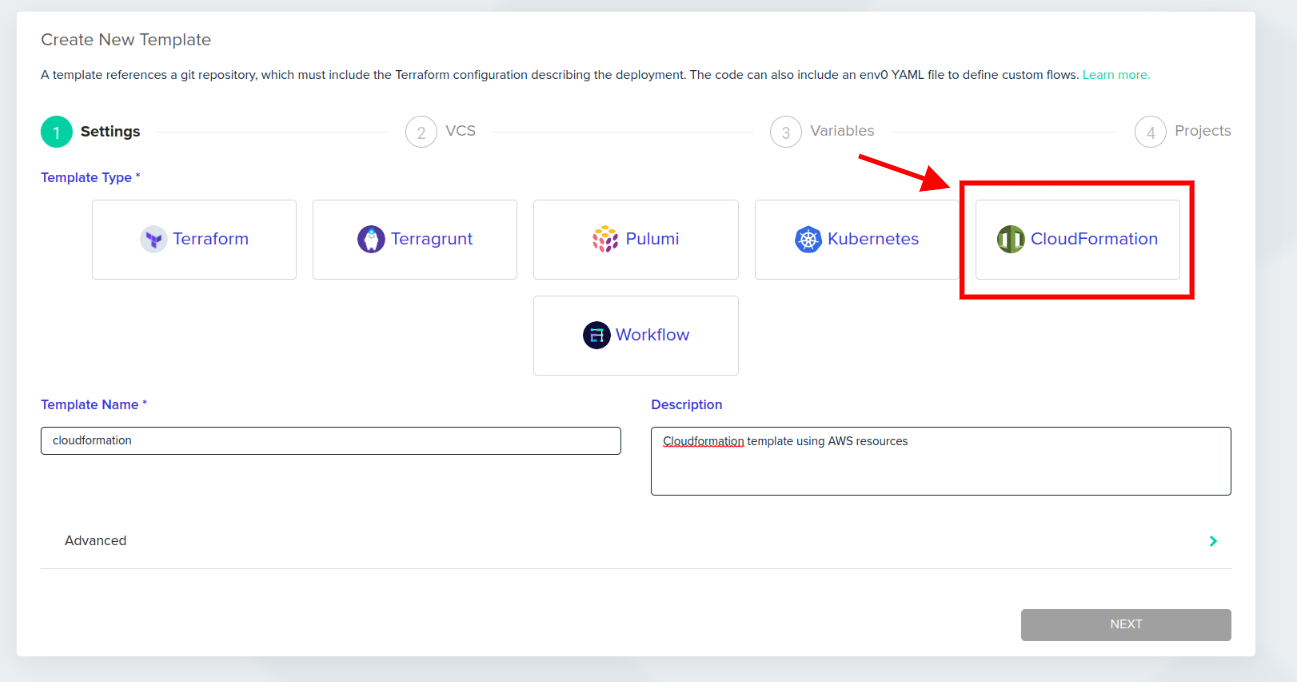
When creating a new template in env0, select the CloudFormation template type.
It’s just as easy setting up your CloudFormation templates as it is adding your Terraform modules or Kubernetes yaml.
How to run CloudFormation envzero without a template
To use CloudFormation without creating a new template in env0, select “create new environment” from within your project:
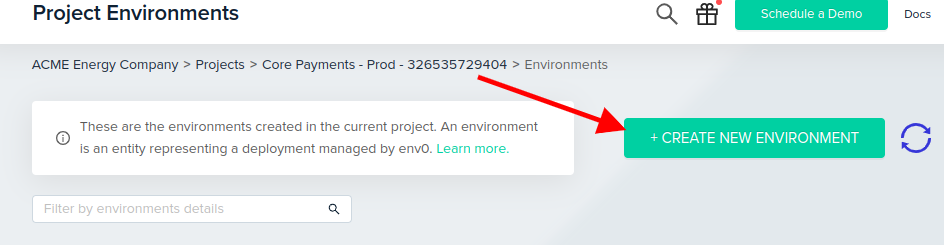
Choose the VCS option to “Create an environment from a VCS integration.” This allows us to create a new environment directly from your source code repo:
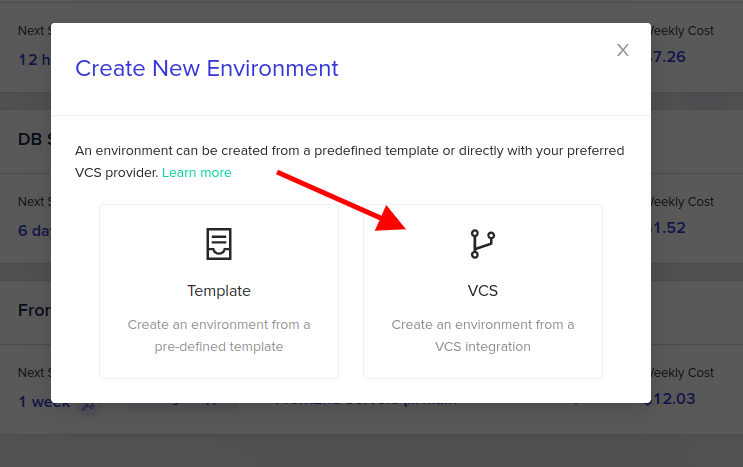
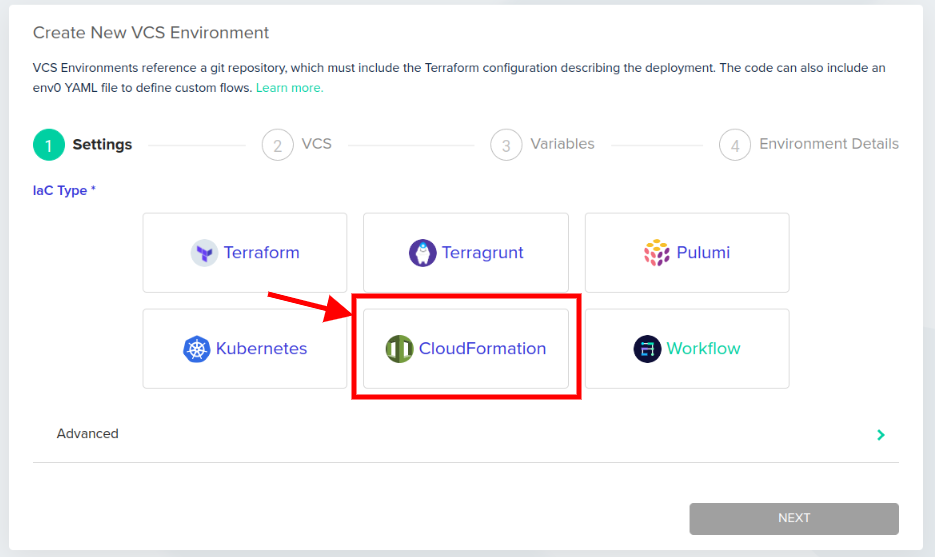
Select the CloudFormation type:
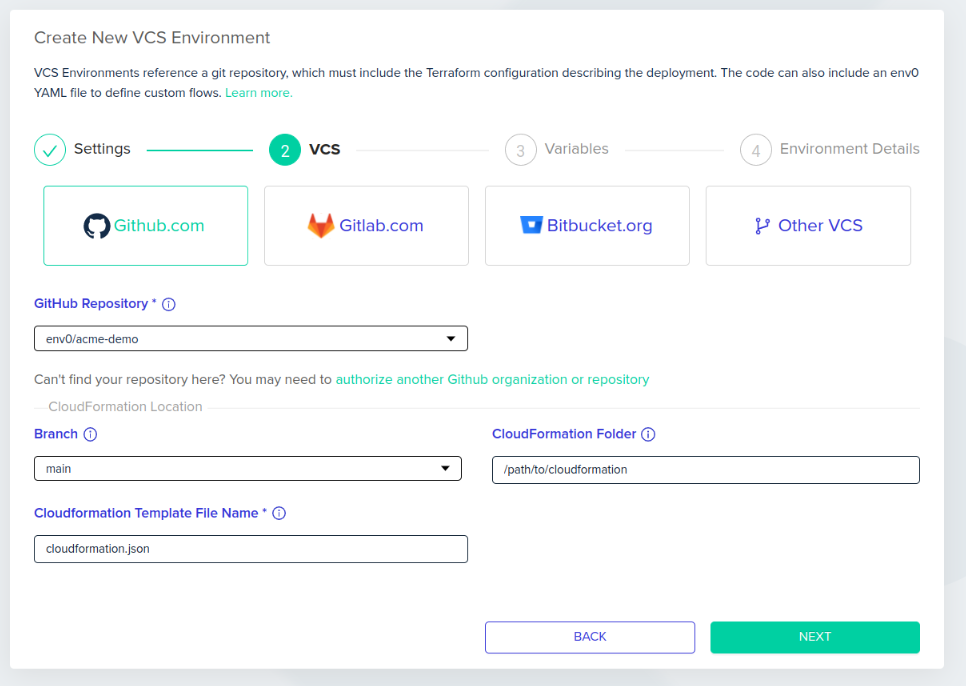
In step 2, choose your VCS, select the repository, branch, and define the path to your CloudFormation folder and template file name:
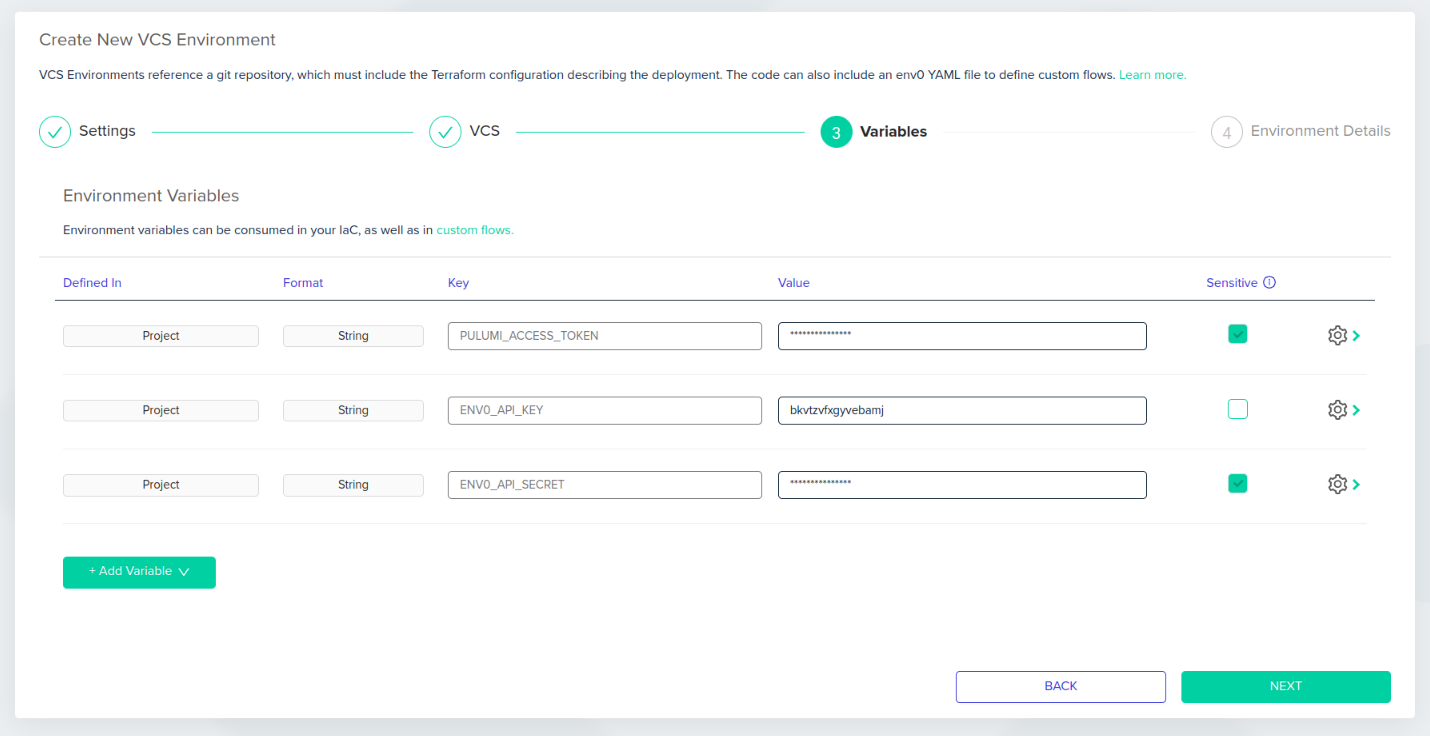
In step 3, define the variables. When creating an environment directly from the VCS, variables in envzero are inherited from the Organization and Project layers. This allows us to reuse common variables, such as VPC IDs and API keys, securely:
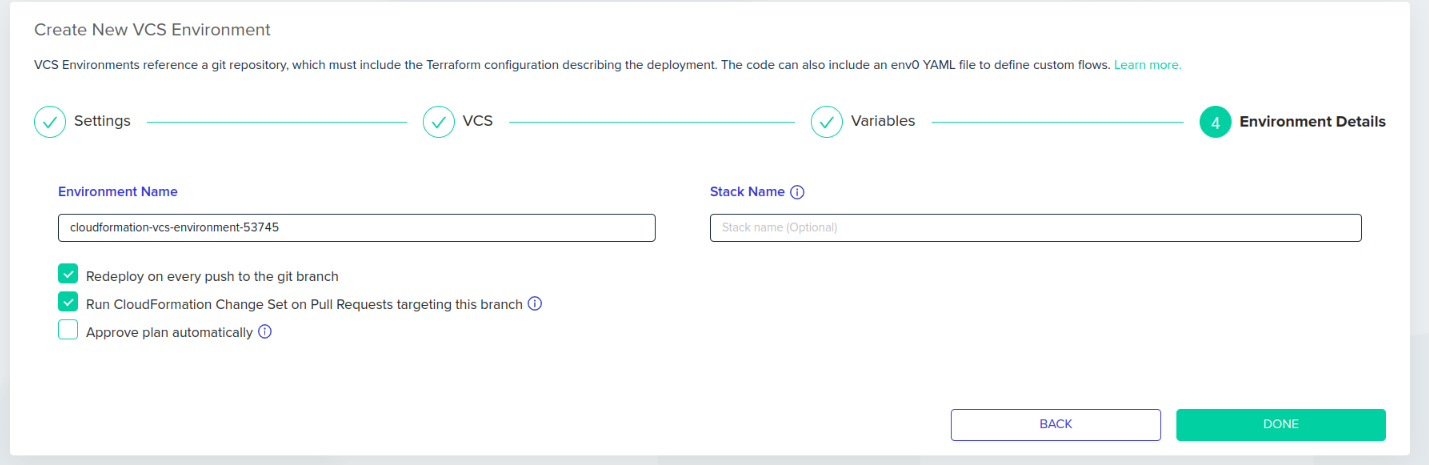
Finally, name your environment and enable your desired envzero features. For example, “Run CloudFormation Change Set on Pull Requests” will comment the results back to your pull requests, and continuously update the summary as changes are committed.
Deselect “Approve plan automatically” to implement an approval step in between merge and deploy to satisfy governance and compliance requirements:
Conclusion
We often find multiple infrastructure as code frameworks when dealing with complex environments. Whether primarily just using CloudFormation, or using it alongside Terraform or Kubernetes, this release makes it easy to automate, orchestrate, and govern the entire infrastructure stack. Instead of relying on manual deployments in AWS, we can define all infrastructure as code, and even combine different frameworks to manage dependencies between resources.
It would be great to get your feedback on this implementation of CloudFormation support, so give it a test and get in touch with your thoughts!
Also, for more information check out this blog where we compareTerraform vs Cloudformation and show how they can be used with envzero platform.

Related Content

The new env zero Agent CLI is available now. Ask your coding agent about your infrastructure in plain English, and it answers from real state, inside the same roles, approvals, and audit trail your team already runs on.
Important Note: The old CLI, the Node package@env0/cliversion 1.x, is deprecated. The current CLI is a single binary and is the recommended way to use env zero from the terminal. Pin@env0/cli@^1to stay on the old one while you migrate.
Today we are launching the Agentic Experience (AX) on env zero, powered by the new env zero Agent CLI. The idea is simple. You point your coding agent, whether that is Claude Code, Cursor, Codex, or Copilot, at your env zero infrastructure, ask it a question in plain English, and it answers from your real environments, deployments, and drift instead of guessing. It is available to every account starting now.
Coding agents are already inside your workflow. They read your codebase, propose changes, and increasingly get asked to do the work rather than describe it. The open question is what they are plugged into when they try. Point one at your infrastructure today and, on most platforms, it sees a thin slice of current state, fills the gaps with guesses, and burns tokens scraping an API that was never meant for a machine to reason over. It can talk about your infrastructure. It cannot reliably operate it.
The Agent CLI changes what the agent is standing on. It gives your agent the full picture, every environment, module, template, plan, and the deployment history behind them, in a form built for a context window instead of a browser tab. Ask a question, and the agent reads real state to answer it. Ask for a change, and it acts through the same roles and approvals a person would. The commands in this post are the plumbing. The product is the conversation on top of them.
Ask your infrastructure a question
Here is what the Agentic Experience looks like in practice. Each example is a prompt an engineer types to their agent. Underneath each one is the command the agent actually runs, the receipt for what it did. You never have to type the command yourself.
"Why did payments-staging go red? Is it our change or drift?"
The agent pulls the environment's full context, its state, recent deployments, and a drift or failure summary, in a single request, then tells you whether the failure traces to your last deploy or to something that changed underneath it.
env0 context payments-staging
"Before I merge this, plan the change against prod and tell me if anything gets replaced."
The agent starts an approval-gated deployment, so the plan runs but nothing applies without a human. It reads the plan, flags any resource that would be replaced rather than updated, and leaves the change waiting for your sign-off.
env0 environment deploy prod --requires-approval
"Which environments in data-platform haven't deployed in 30 days, and what are they costing us?"
The agent lists every environment in the project as structured data, filters by last deployment date, and adds up the cost estimates, so you get the stale environments and their spend in one answer.
env0 environment list --project data-platform -o json
"Anything waiting on my approval? Summarize what each one changes."
The agent finds the deployments paused at an approval gate, reads each plan, and gives you a one-line summary of what every pending change would do before you approve or cancel it.
env0 deployment list -o json
None of these require you to know the commands, and that is the point. The Agent CLI hands the agent structured JSON on stdout, errors on stderr, and stable exit codes, so it can chain reads and actions and know exactly what happened at each step without you translating between English and the API.
Governance that already applies to agents
This is the part security teams care about, and it works today.
An agent on the Agent CLI is not a special case that sits outside your controls. It authenticates as a real env zero identity, per user through the browser or per service through an API key, never a shared token, so every read and every action is attributable to someone rather than fired anonymously.
Because your existing role-based access control applies to that identity, you decide what the agent can do simply by choosing the identity you give it. Hand it a read-scoped identity and you get an agent that can diagnose anything and change nothing. It can pull context, list environments, and read plans and logs, while deploy, destroy, and approve are not available to it at all. Give it a broader identity and the approval gates still hold. A deployment that requires approval pauses for a human no matter who or what started it, and destroying infrastructure still takes an explicit confirmation.
So the safe pattern is available now, with no new product to adopt. A read-only agent that investigates and explains, a human in the loop for anything that changes infrastructure, and a full audit trail, because the agent acted as itself and not as a key nobody can trace.
The skill is the seed of your agent operating policy
Getting an agent set up is one command.
env0 skill install
That writes a usage guide into your coding agent's config so it knows the exact commands, flags, and output formats for the version of the Agent CLI you have installed. It sets up Claude Code by default, with --agent cursor, --agent codex, or --agent copilot for the others.
Two things about that guide matter more than they first appear.
It is version-matched. The agent works from the command surface you actually have, not one it half-remembers from training. Invented flags are the fastest way for an agent to lose an engineer's trust on infrastructure, and a version-matched guide is how you keep them out.
And it is a file in your repository, not a hosted black box. You commit it, and you extend it. Add your own conventions on top: the golden-path templates a new environment should start from, a rule that no agent touches prod without approval, a list of projects that are off limits. Once it is committed, every agent that every engineer runs inherits the same operating manual, and it gets reviewed in a pull request like any other code. You are not just installing a skill. You are planting the seed of your team's agent operating policy, in version control, where it belongs.
Why it goes deeper than an API wrapper
A generic CLI wrapped around an API is only as good as the API underneath it. env zero already understands your environments, your modules, your deployment history, and how they connect, and the Agent CLI is built on that understanding rather than layered over it.
The clearest example is env0 context. It returns an environment's state, recent deployments, and drift or failure summary in a single call, so an agent diagnoses a broken deployment in one request instead of stitching the picture together across several. Fewer round trips, less context spent, and an answer grounded in real state.
It also clears the three obstacles we heard about from nearly every team that tried to put agent access in front of a platform. Security teams distrusted a shared, unattributable credential. One enterprise customer's security team blocked our old MCP server outright and started patching around the credential model before they ever raised it with us. Setup was a wall. As one account team put it while describing the self-hosted container, four out of five customers got stuck standing it up. And even where it worked, the surface underneath was thin, showing the latest deployment only, with no history. The Agent CLI answers all three. There is no container to stand up, a real per-identity login replaces the shared token, and the surface is deep enough that an agent never has to fall back to the raw API for context.
The old MCP server keeps working for existing integrations, but new agent capability lands in the Agent CLI now. That is where the Agentic Experience lives going forward.
What's in this release
- Point Claude Code, Cursor, Codex, or Copilot at env zero and ask about your infrastructure in plain English
- Read across environments, deployments, projects, templates, and plans, including full history
- Diagnose a failed environment (state, recent deployments, and drift) in a single env0 context call
- Run core actions when you allow it: create, deploy, destroy, approve, cancel, abort
- Scope agents with your existing roles and approvals, with every action attributable to a real identity
- See cost estimates alongside your reads
- Install a version-matched, extensible skill for your agent with one command
What comes next
Today you scope an agent by choosing the identity you give it. Next, we are making read-only the default for agents regardless of the human behind them, with write access as an explicit, audited step someone has to grant. An engineer with full permissions still gets a read-only agent unless they deliberately elevate it.
We are also expanding what an agent can see, starting with policy and governance configuration, so it can read the guardrails a project runs under and not just its deployments, and we are widening the read surface from there.
The goal has not changed. Give an agent enough real context to be useful, and never more access than it has earned.
Get started today
The env zero Agent CLI is available now. Install it with Homebrew or npm:
brew install env0/tap/env0
- Sign in with:
env0 login - Run and setup your agent with:
env0 skill install - Ask your first question
The full env zero Agent CLI documentation covers every command, flag, and output format.
Want a walkthrough? Schedule a technical demo to see the Agentic Experience in action.
FAQ
What is the env zero Agentic Experience? It is the ability to point a coding agent, such as Claude Code, Cursor, Codex, or Copilot, at your env zero infrastructure and work with it in plain English. The agent answers from your real environments, deployments, and drift, and can take action through the same roles and approvals a person would. It is powered by the new env zero Agent CLI, available now.
How is this different from the old MCP server? The MCP server needed a self-hosted container and a single shared credential, and it only ever saw the latest deployment. The Agent CLI installs directly as a single binary, authenticates per user or per service account, reads the full history and diagnosis surface, and returns structured output an agent can parse without extra tooling. The MCP server keeps working for existing integrations, but new agent capability lands in the Agent CLI.
Can I stop an agent from changing infrastructure? Yes, today. An agent authenticates as a real env zero identity and inherits that identity's role. Give it a read-scoped identity and it can diagnose but not deploy, destroy, or approve. Even with a broader identity, approval gates still pause changes for a human, and every action is recorded against the identity that ran it.
What exactly does the skill do? env0 skill install writes a version-matched usage guide into your agent's config so it knows the real commands and flags for the CLI you have installed, which keeps it from inventing them. Because the guide is a file in your repository, you can commit it and extend it with your own conventions, so every engineer's agent inherits the same rules.
What is on the roadmap? Read-only-by-default access for agents regardless of the human behind them, with an explicit, audited path to write access, broader policy and governance visibility in the CLI, and continued expansion of the read surface.
Get started: install the env zero Agent CLI or read the docs
Announcing the env zero Agentic Experience: Point Your Coding Agent at Your Infrastructure


Important Note:@env0/cliversion 1.x, is deprecated. The current CLI is a single binary and is the recommended way to use env zero from the terminal. Pin@env0/cli@^1to stay on the old one while you migrate. Please see details on the new env zero CLI here.
At envzero we know how important workflows are for developers, which is why we’re excited to announce the brand new envzero CLI! Just like our GUI at envzero.com and our API, you can make use of the features and capabilities of envzero through the CLI to build your own perfect workflow.
Why a CLI? As your system becomes more robust and complex, you may often find yourself working with different service providers and 3rd-parties to assist your dev team. Whether it’s your cloud provider, different security-related solutions or CI/CD platforms, they usually provide you with a decent user interface to handle your requirements and actions. As time goes by, you could find yourself wanting a better degree of automation to your day to day operations. A CLI is a great way to do all this without ever having to change context or even take your hands off the keyboard.
And because we’re big supporters of Open Source and believe in sharing our code with the world, we’re proud to say that our CLI is fully open-sourced. The CLI can be found on GitHub and is published via npm and you’re welcome to leave your feedback and contribute.
Setting Up the CLI
First, we need to verify that NodeJS (a dependency for the CLI) is installed and that we can globally install our package:
npm install -g @env0/cli
// or
yarn global add @env0/cli
After installing the command line tool, we need to head over to the envzero UI to create a new API key and secret for our CLI usage. You can find it under the Organization -> Settings -> API Keys screen.
Now we need to configure the CLI tool with proper settings and secrets using the envzero configure command:

If you aren’t aware of your organization, project and blueprint IDs — don’t worry! Head over to app.envzero.com and follow our walk through to learn about the different entities in the flow.
Now that we have a properly configured CLI, we can run our first deployment using the envzero deploy command, or have our existing environment taken off using the envzero destroy command!
Using the CLI
Once your CLI is set up, you can use it to easily manage your cloud environments from your local machine, while maintaining all the governance and visibility that envzero gives you. What can you do with the CLI?
Deploy/Destroy
Deploy or destroy your environments using
envzero deploy
// or
envzero destroy
And just wait a little to see your live deployment getting updated on your console’s output!

Plan/Approve Plan
Another common practice in the envzero platform is to run your deployment where it’ll wait for an approval before applying actual changes. This flow is also achievable via the new CLI using the - requiresApproval (-a) argument.
envzero deploy -a
// or
envzero destroy -a
Your deployment will halt and wait for approval before continuing. In order to approve or cancel your current environment’s deployment you can use either of the commands:
envzero approve
// or
envzero cancel
For extensive information on how to use the above commands please approach the envzero CLI official README.

Streamlined Deployment Steps Logs
When dealing with deployments, the most interesting view is the console output that shows your deployment logs. On the envzero platform, you already get an organized and detailed view of your deployment logs, divided into predefined steps (i.e git clone, terraform init, terraform plan/apply and etc.)
The envzero CLI keeps the same experience with streamlined deployment steps logs that are sent to your console right away and gives you a live view of your deployment status.

Learn More
Using the envzero CLI lets you and your team enjoy the convenience of a local CLI with all the automation, governance, and visibility that envzero brings for your environments and their deployments. Feel free to test it out and provide us with feedback!
You may also follow our detailed README for a full list of the commands and their available arguments.
You’re more than welcome to check us out on envzero.com. don’t hesitate to reach out if you have any questions or schedule a demo with us if you’re interested to hear more!
Introducing the env zero CLI


“All these investments in DevOps and developer productivity and operational efficiency are bottlenecking in these environments on security and compliance.”
This was an observation from Andrew Clay Shafer in a fireside chat with John Willis at DevOps Days Dallas 2022. One such bottleneck can come in the form of audit logs, but auditability doesn’t have to be a blocker.
In this post we’ll take a look at why auditing is necessary for Infrastructure as Code, the benefits of having an audit trail for Terraform and other IaC frameworks (such as Terragrunt, Pulumi, CloudFormation, Kubernetes, and others), and share how you can automate your audit trail easily with env0.
How do you audit Infrastructure as Code?
All you need is a central log management system that can aggregate and parse your audit. env zero delivers a number of benefits for auditability:
- Changes to infrastructure are tracked in the code repository, making it easy to see who made what changes and when.
- Automatically roll back changes that cause problems.
- Audit changes made by third-party vendors.
Audit log walkthrough
There are two ways to access audit logs in env0, 1) through the UI, and 2) through the API. As always, env zero gives you the flexibility to interact with your infrastructure-as-code as it suits your organization, be it programmatically or through a simple user interface. Only an Admin user can access the Audit Logs.
The audit log contains information about who performed the activity, when the action was performed, the activity’s description, and additional data like their IP address.
The audit log shows events related to changes in your:
- Organization
- Projects
- Templates
- Environments
- Teams
- Users
- Roles
- Modules
- Git Tokens
- Cloud credentials
- API keys
- SSH keys
- Variables
- Agent configurations
Through the env zero UI
- Go to the Organization's Settings page.
- Click the Audit Logs tab.
- The audit details are listed in a table.
- Click the row's + sign to reveal additional activity details.
- Click the Show more button at the bottom of the page to see more rows.

Through the env zero API
Use the "Fetch Audit Logs" API to retrieve your organization's audit logs programmatically. Learn more about the audit log in our documentation.
Use an audit log for governance and compliance
With this latest release, we’re continuing to deliver the enterprise-level capabilities to enable DevOps, Platform, and Infrastructure as Code teams to deliver secure software faster while ensuring compliance with internal policies or external regulations. env zero has clearly auditable versioning of infrastructure changes, giving you the answer to questions like, “What was changed, who changed it, and when was it changed?”
We help you avoid the audit and compliance bottleneck, so you can focus on what’s important—shipping software.
You Need Audit Logs for Your Infrastructure as Code, and They’re Easy to Set Up


In a recent blog post, I discussed expanding the idea of “Feature branches” to “Feature environments”. Using Infrastructure-as-Code, we can create an environment for every feature we are working on, thereby giving us a more flexible, isolated development environment, and allowing us to test our code early in the development process.
In this post I’d like to continue down that path, and see how we can automatically create an environment for every pull request, and gain a number of advantages over traditional static staging or qa environments.
Pull Requests & Moving Beyond Static Staging
Pull requests are a well known and common workflow step for many development teams. We usually think of them as a way you “tell others about changes you've pushed”, and where you “can discuss and review the potential changes with collaborators and add follow-up commits before your changes are merged”.
PR’s are more than just a code review - they’re a milestone in a feature’s lifecycle and a way of saying “I’m ready for this to be shared”. Beyond sharing it for feedback with the wider team, this milestone is a critical time to ensure it functions exactly as expected as part of the whole application, including any potential infrastructure or configuration changes. However - just as we wouldn’t want our data migration to run on the shared database at this point, we also want to use dedicated test infrastructure.

Static VS Dynamic PR Environments
At this point, you might ask yourself - I’m already testing my code and infrastructure changes in our dev/qa/staging environment, why complicate things?
Well, there are a number of advantages to moving from traditional, static environments, to dynamic, per-pull-request environments:
- They’re Isolated and Dedicated - having a dedicated environment for each PR means no more confusion of which version or branch is currently in staging, and no coordinating between people who want to test different versions.
- Easier To Share - Because each PR has its own fully functional environment, non technical stakeholders can provide feedback on new features very early in the process. Developers can then iterate over this feedback - without interfering with work being done by other team members.
- No Wasted Resources - Because you’re only provisioning an environment when you actually need it for testing, you’re not wasting (or paying for) resources when you don’t actually need them.
- Removes Bottlenecks In The Release Cycle - Shared development and staging environments are notorious bottlenecks for development teams, especially when they are the first place where new code meets infrastructure. It’s not uncommon to see a queue of who is using the environment for testing their features. Your developers time shouldn’t be spent on waiting.
How Do You Actually Do It?
Ok, so “per pull request environments” is an awesome idea. How are we going to actually get there? There are a number of tools out there that can help you accomplish this task but in this post, I’ll be using env0, a first of it’s kind environment-as-a-service platform - not just to deploy the environments, but to manage them as well.
Your default assumption might be to just use your CI/CD platform to set up your environment. This works, but most CI/CD platforms are built for running short lived tasks, whereas an environment’s lifecycle extends beyond deploying it once: It needs to be updated, monitored, and in the end destroyed. Besides easily automating resource provisioning using Terraform, env zero will help me keep track of which environments are up, which ones have had issues, and will provide me a top level view of how my whole team is using these environments.
Besides env0, I’ll be using Github to host my code and open pull requests, and Github Actions to trigger my environment creation. I’ll be using the same code example from the previous post, which will be deployed on AWS.
If you’d like to try this out yourself, the prerequisites for this tutorial will be
- An env zero account (it’s free, just login)
- A Github account
- An AWS account

Getting Our Hands Dirty
Step one to fully automating anything is to make sure we can run it manually, so you’ll want to get your system set up. In my case, I’ve followed env0’s getting started guide, and taken the key steps of creating my own organization, connecting my AWS account, and creating a template for my Terraform code.
Custom workflows to the rescue
In the example code I’ve used, I also ran a bash script before deploying the environment. We can easily make sure this code runs before our Terraform is applied, using env0’s Custom Flows feature. I’ve already done this in advance and I’ve put my code in the env0.yml file, in our Github repo.
Let ‘er Rip!
We are ready to launch our first environment! Remember - this is just a manual test, to see things are ready for automation.
In the case of env0, just go to your Project Templates pages, and click “Run now” on the template we’ve created before. In the next screen, you can validate your settings, and when you’re ready - click “Run”.

Great!
Integrating into CI/CD
Now that we know our environment management system will properly configure our environments, we need to make it run each time we open a pull request. For that, we’ll be using Github Actions to trigger env0’s CLI.
In order to create an environment on env zero from Github Actions, we need to create an API key for env0.
Next, we’ll need to save the API key and secret as Github Secrets, in the same manner we saved our AWS credentials to env0.

The final step of connecting everything, is telling Github how to trigger our environment deploy. We’ll add the following code to our codebase, in the file `.github/workflows/pr-environments.yml`.
name: "PR Environments"
on:
pull_request:
types: [opened, closed, reopened, synchronize]
jobs:
env0_pr_environment:
name: "PR Environment"
runs-on: ubuntu-16.04
env:
ACTION: deploy
steps:
- name: Set Action
if: github.event.action == 'closed'
run: echo "::set-env name=ACTION::destroy"
- uses: actions/setup-node@v1
with:
node-version: '12'
- uses: actions/checkout@v2
with:
repository: env0/env0-client-integrations
- name: install
working-directory: node
run: yarn
- name: deploy
working-directory: node
run: >
node env0-deploy-cli.js
--apiKey ${{ secrets.ENV0_API_KEY_ID }}
--apiSecret ${{ secrets.ENV0_API_KEY_SECRET }}
--action $ACTION
--organizationId ${{ secrets.ENV0_ORG_ID }}
--projectId ${{ secrets.ENV0_PROJECT_ID }}
--blueprintId ${{ secrets.ENV0_BLUEPRINT_ID }}
--environmentName "${{ github.head_ref }}"
--revision "${{ github.head_ref }}"
In the code above, you can see we
- Determine the action depending on the Github event data
- Fetch the env zero CLI, using the `checkout` action
- Run the env zero cli to deploy, update, or destroy the environment
- The name of the environment will be the branch name
That’s all folks!
We now have a fully functioning pipeline, and our setup will automatically create a new environment for every PR we open! When we deploy a new feature, even if that feature requires new or different infrastructure, the changes in our Terraform code will automatically be reflected in the resources provisioned for the PR environment!


In the case of env0, even though environments will be automatically created and destroyed by our CI/CD integration, we can also use the env zero UI as a control plane, for understanding which environments are up, and what they consist of. You can also use env0’s cost monitoring features, to understand how much each of these environments actually costs.

Thank you for taking the time to read this post, I hope it helps you setting an environment-per-PR pipeline for your team. Once you’ve tried it yourself, I’d love to hear about it! Let me know in the comments below or on Twitter at @envzero.
Why You Should Be Using Per-Pull Request Environments (and how!)


In this guide, we will be exploring three IaC scanning tools, Checkov, tfsec, and Terrascan. We will go into detail of each tool, as well as compare the features of all three. You can explore the other parts of this guide below.
Jump to section:
Checkov vs tfsec vs Terrascan: Which IaC Scanning Tool is the Best?
Infrastructure as Code (IaC) is a popular approach to automate the provisioning and management of cloud computing resources using declarative configuration files. However, IaC also introduces new security challenges and risks that need to be addressed before deploying to production. In this blog post, we will compare three popular IaC scan tools: Checkov, tfsec, and Terrascan. These tools can help you identify and fix security issues in your IaC code before they become vulnerabilities in your cloud environment. We will compare them based on their features, performance, usability, and compatibility with different IaC frameworks and cloud providers.
Comparing IaC Scan Tools: Video walkthrough
Our setup
Let’s take a look at our setup.
Requirements
- A GitHub account (all the hands-on sections will utilize GitHub’s Codespaces so you won’t need to install anything on your machine)
Repository
TL;DR: You can find the repo here.
What is an IaC scan tool and what is it used for?
Alright, before we dig in, let’s get an understanding of a few concepts.
An IaC scan tool is a software application that analyzes your IaC files and detects security vulnerabilities, misconfigurations, compliance violations and other issues. IaC scan tools improve the quality and security of IaC files before they are deployed to cloud environments. These tools can help developers, DevSecOps and DevOps teams identify and fix potential problems in their code early in the development lifecycle, reducing the risk of potential data breaches, data leaks, downtime and other incidents.
What is Static Code Analysis?
Static code analysis is a method that examines the source code of a program without running it. Static code analysis tools can automate this process and detect possible errors, security vulnerabilities, and code quality issues. Static code analysis can help developers find and fix problems early in the development cycle, before they become more costly and difficult to resolve. Static code analysis can also help ensure that the code meets certain standards and guidelines, for such issues as coding style, performance, or compliance.
How does IaC scanning work?
IaC scanning works by applying a set of rules or policies to the IaC configuration files that check for common security best practices, such as encryption, authentication, authorization, logging, and monitoring. The rules or policies can be based on industry standards, such as CIS benchmarks, or customized to fit the specific needs of the organization. The IaC scanning tools can then generate a report that shows the results of the analysis, such as the number and severity of vulnerabilities found, the location of the vulnerable code, and the recommended remediation steps. The scan report itself can also be integrated with other tools, such as GitLab or GitHub, to provide feedback and guidance to developers in their workflows.
Why do you need IaC security scanning?
Imagine you are building a house and you have a blueprint that shows how everything should look and work. You wouldn't want to start construction without checking the blueprint for errors, right? You might end up with a leaky roof, a crooked wall, or faulty wiring. That's why you need IaC security scanning. It helps you find and fix any issues in your infrastructure as code before you deploy it to the cloud. It's like having a quality assurance team for your blueprint. IaC security scanning can save you time, money, and headaches in the long run.
Which IaC scanning tools exist?
Some of the most popular IaC scanning tools are checkov, tfsec, and terrascan. These tools can help you identify common vulnerabilities and best practices in your IaC code, such as Terraform, CloudFormation, Kubernetes, and more. However, they are not perfect and they may have some limitations or false positives. Here is a brief comparison of these three tools and later we will dig deeper into each one.
- Checkov: A comprehensive tool that supports Terraform, CloudFormation, Kubernetes, Helm, Serverless Framework, and more. It has a rich set of features and integrations, such as pre-commit hooks, GitHub actions, VS Code extension, etc. However, it may be slower and more complex than other tools.
- tfsec: A fast and lightweight tool that supports Terrafor. It has a simple installation process and a nice output format. However, it may not cover all the resources or scenarios that you need.
- Terrascan: A modular tool that supports Terraform, Kubernetes, Helm, Dockerfiles, and more. It has a flexible architecture that allows you to write your own policies using Open Policy Agent (OPA). However, it may have a steeper learning curve and less documentation than other tools.
As you can see, there is no one-size-fits-all solution for IaC scanning. You may need to try different tools and see which one works best for your use case. Or you may need to use a combination of tools to achieve the best results. The important thing is to scan your IaC code regularly and fix any issues that you find before they become a problem.
Which IaC Scanning Tool is the Best?: Comparing Checkov vs tfsec vs Terrascan


What is Infrastructure-as-Code
Infrastructure-as-Code (IaC) is a method of automating the management and provisioning of infrastructure resources. Instead of manually clicking buttons on a web console, IaC enables organizations to describe their system architecture using code, allowing them to store, version, and track changes to their systems and application infrastructure.
The goal is to automate the process of setting up, configuring, deploying, and managing applications. IaC is a powerful technology that allows you to provision and manage any cloud resource in an automated, declarative way. Infrastructure-as-Code is now the de facto standard for new projects and the focus of many organizations is now migrating from legacy architecture to IaC.
Before Infrastructure-as-Code: Pre-IaC Architecture
IaC’s major transformation was that developers could now create a consistent, repeatable workflow, bringing about wider-scale deployments across a range of resources, environments, and locations.
Delving a bit deeper, how did it achieve this? IaC provisions infrastructure and application resources through machine-readable definition files instead of through physical hardware configuration or interactive configuration tools.
Before, infrastructure management was a costly, manual process that hindered scale and availability. There was extreme variability in infrastructure largely due to manual configuration. Manual processes were more error-prone and could not be scaled, much less standardized. Remote access tools slowly entered the market, but system administrators (sysadmins) still had to provision new hardware and resources manually by connecting to remote cloud providers via APIs.
Environment drift: When infrastructure for an application's software development process – development, staging, and production environments falls out of sync. Environment drift, or configuration drift, causes inefficiencies and can be expensive in direct cost and potential user experience impacts. If your app’s development environment varies from the production environment, this can lead to failure in production or bugs, and even prevent recovery in the event of disaster.
Automation changed that, reducing the problem of forgotten tasks, automating configuration drift detection, and allowing other features to automatically manage infrastructure problems or remedy issues. Among those revolutionary features were version control systems (VCS), configuration management tools, and orchestration capabilities.
Infrastructure-as-Code Benefits
Now, IaC has made IT more efficient than ever before, solving numerous IT challenges and enabling new capabilities such as:
Recreating environments
It used to be challenging to recreate an identical environment after deployment because the systems it interacted with also had to be updated.
With Infrastructure-as-Code, users can recreate infrastructure from scratch, and on-demand, simply by replaying code. The pipeline uses a prescribed set of parameters for deployment and creates a new environment that is identical in terms of the number of hosts, networks, data centers, clusters, data stores, etc., every time that it runs. The infrastructure code can even be versioned with the product, making it easy for engineers to recreate the infrastructure as it was when a previous version of the product was released.
Minimizing errors
IaC minimizes the need for manual infrastructure management, reducing the risk of human error. Rather than depending on engineers to remember past configurations or respond to failures, everything is in the code, under your source control system.
When changes go to production, the infrastructure code is checked in a code review or in a review by a gatekeeper.
Supporting teamwork and collaboration
Using IaC, engineers don’t have to deal with problems caused by conflicting changes in a shared environment. Infrastructure-as-Code makes it easier to work as a team and to share code with colleagues and other teams, so they can utilize it to set up their own environments. Using a VCS, different teams can each work on a separate piece of the infrastructure, rolling out their changes in a controlled manner.
Reducing cloud expenditure
The shift from bare metal infrastructure investments to the cloud reduced CapEx, and IaC has reduced them even further by enabling auto-scaling capabilities. With IaC, a software developer writes code and configuration management instructions that trigger actions according to actual needs and accurately reflects the structure of the real operating environment. Infrastructure-as-Code lets you manage your environments easily and automatically deactivates environments you no longer need.
DevOps and Infrastructure-as-Code
DevOps emphasizes automating manual tasks that typically take up a lot of software developers’ and IT operators’ time. IaC is one of the key technical practices that enable DevOps within an organization, by automating the provisioning and management of IT infrastructure. With IaC, developers can self-serve the provisioning of environments, saving time for them and the operations team.
How Infrastructure-as-Code Works
Key Concepts
- GitOps – This involves integrations between your IaC tech stack and the infrastructure itself via your Git repository (on GitHub, GitLab, Bitbucket, etc.). This includes streamlining changes as much as possible, such as embedded PR commands.
- Version Control – This is related to GitOps, where you will want to have a firm grasp on what versions of a framework, module, provider, or code you are using for your current work or for a specific kind of deployment.
- State Management – This refers to the storage and maintenance of your desired state. Some IaC tools do not encrypt state files by default. For example, Terraform does not encrypt (it’s a premium feature in Terraform Cloud) while OpenTofu does.
- Registry – A registry is a marketplace for finding add-ons, integrations, packages, and policies. It often refers to the Terraform Registry.
- Templates – Templates refer to reusable packages of code or files that provision resources in certain configurations. They should be git-based.
- Modules – This is the term for a configuration package, or collection of config files, in Terraform.
- Providers – This is the term for an integration mechanism, akin to an API, between Terraform and a third-party app.
- FinOps – This refers to the automation of cost monitoring, spending projections (cost estimation), and budget notifications/alerts so users can track the expense of their cloud deployments (in IaC and other sectors of DevOps).
- IaC Pipelines – This is an ordered sequence of common or repetitive tasks that is configured to run automatically so as to save teams time with projects.
- IaC Workflows – This refers to the sequence of status changes of infrastructure within a pipeline.
Declarative vs. Imperative Approach for Infrastructure Configuration
As with other subjects in DevOps, infrastructure has declarative and imperative approaches. Think of it like a means to an end; or rather, the imperative approach defines the means and the declarative approach defines the end.
The imperative approach focuses on the sequence of commands needed to reach the desired state of your application, specifically in this case your infrastructure. In contrast, the declarative approach is becoming more popular thanks to better automation tools, as devs can define the endgame state and a given tool will configure an environment to reach that stated goal.
Chef is the most prominent tool relying on imperative programming for IaC. Some have a mix of imperative and declarative implementations, namely Pulumi, Salt, and Ansible. However, declarative is gaining traction and effectiveness thanks to advances in automation. Declarative IaC tools include OpenTofu, Terraform, AWS CloudFormation, and Puppet.

Challenges and Best Practices
Many best practices for IaC overlap with DevOps best practices in general. However, there are caveats specific to maintaining code-based infrastructure.
Idempotency
Yeah, read that word carefully. This refers to being able to reapply code multiple times while getting a consistent result every time. This is as much a principle as it is a requirement to automate infrastructure, and templating will reduce or outright eliminate errors in many use cases. The goal of consistency also relates to testing, making sure that a deployment works in multiple environments and avoids the ‘it works on my machine’ problem.
CI/CD & Testing
Many teams have not instilled continuous integration and continuous deployment into their infrastructure deployments. CI/CD should be standardized in all layers of development and operations, including IaC. Constant changes to infra require testing and full VCS integration.
Observability – Logs & Debugging
Depending on the kind of deployment, you should have logging configured across your entire tech stack. Additionally, consider metrics and tracing to monitor every level of your infrastructure. Finally, debugging should be standard protocol with any code changes, especially if you’re changing code within a resource instead of switching out resources.
Immutability (when applicable)
Immutability refers to making code unchangeable. In such cases, changes mean replacing a resource entirely rather than editing its internal code. This is not always practical, but when it is, it eliminates an area prone to frustrating errors.
Version Control (including environmental parity)
As mentioned with CI/CD, VCS can protect you from influencing the wrong environment or pushing changes that aren’t applicable in some versions of your Infrastructure-as-Code framework. This is even more essential when dealing with multi-framework deployments, which get confusing.
Cost Management/FinOps
Cost management and cost projection/prediction are getting better with newer tooling available to all classes of developers, and the same with IaC FinOps for system architects. Tracking cloud spending gets tricky, especially with the long list of internal features that cloud providers like AWS or Azure offer.
State Management
Storing the state of your IaC framework is fundamental. With many tools moving toward declarative programming, keeping that well-defined state protected is crucial.
Modularization
Relating to templates and paralleling containers, IaC frameworks like Terraform and OpenTofu rely on modules to organize resources defined by configuration files in the same directory. In the case of Terraform, they will be .tf or .tfjson files. There are three primary reasons behind using a Terraform module: 1) packaging resources together that will be used together in a reusable configuration, 2) sharing standardized configurations across organizations, and 3) don’t-repeat-yourself programming (DRY).
Access (Roles and Users)
This is part of the security concerns of an IaC setup. You want to manage and allow access to as many people in your organization as possible, but make sure that levels of access are well-defined in specific roles. This makes RBAC, role-based access control, as essential in IaC as any other sector of DevOps.
Watch out for these IaC Pitfalls...
While IaC has clear advantages, it also presents unique challenges that usually emerge as you scale.
1. Integration with management tools
To harness the full benefits of IaC, it must be integrated into all processes, including CI/CD workflows, notification tools like Slack, security tools, system administration, IT operations teams, and DevOps teams, with well-documented policies and procedures. Without full integration, errors can quickly spread across the system.
2. Longer turnaround
When using IaC, every change has to be coded, tested, and reviewed before it is applied. Changes are more complex and must be planned carefully to avoid significant downtime. Learn more: Video: Top IaC Challenges
3. Lack of cloud expense oversight
Since IaC deploys infrastructure components automatically, it can be hard to keep track of expenses. Development teams are often unaware of the financial ramifications of their code, and expenses can build up quickly without monitoring tools that are designed for IaC.
That’s why some would explicitly include FinOps in the rubric of IaC. Regardless, it’s an essential part of managing complex infrastructure. For instance, env zero includes cloud cost monitoring and optimization in its feature set.
IaC Toolchain Sprawl
One of the primary benefits of adopting Infrastructure-as-Code is consistency, which is only possible if teams across your organization are using different IaC tools and approaches. In many cases, implementing IaC requires a cultural shift in addition to the technical one to ensure success. The advantages far outweigh any overhead associated with implementing and managing IaC.
We’ll try to make some sense of that tool sprawl with the following section, covering the major frameworks and associated platforms in the world of infra.
Infrastructure-as-Code Frameworks
IaC’s major tools are frameworks that incorporate multiple functions into a single platform. The list below starts with those assets and then continues with IaC tools that are popular for one or multiple functions within IaC tech stacks. The following Venn diagram shows what kind of features go into a complete IaC framework, but note its complex structure that shows some tools can cover much of what you need for a deployment, but not everything.

Terraform & OpenTofu
Terraform is an IaC tool created and maintained by HashiCorp; it is currently the most widely used Infrastructure-as-Code tool in the industry. It is widely credited with creating common best practices including arguably the use of declarative programming.
In Summer 2023, Terraform moved away from Open Source licensing. As a response, several companies (including env0) collaborated to create an open-source, alternative known as OpenTofu. OpenTofu is currently managed by the Linux Foundation. Its initial release, v1.6.alpha, seeks to be a drop-in replacement for the Terraform version of the same number.
Terragrunt
Terragrunt is a thin wrapper for Terraform that provides additional tools for deploying hooks, managing dependencies, remote states and multiple environments, as well as keeping your Terraform configuration files DRY (Don't Repeat Yourself). Terragrunt is open-source and a popular choice for Terraform users looking for ways to keep their codebase efficient, clean and well-organized.
AWS CloudFormation
CloudFormation is the AWS service for IaC. It uses JSON or YAML to define resources. Its added advantage is that it works seamlessly with other AWS tools. On the flip side, its main disadvantage is that it only handles AWS infrastructure resources. Additionally, it limits templates to only 500 resources apiece, arbitrarily still keeps some processes manual, and has confusing documentation.
Pulumi
Pulumi is an open-source IaC framework that uses common programming languages to configure and provision resources rather than a domain-specific language like HCL. That also allows it to take advantage of inherent features of languages like Python, JavaScript, C#, and Go among others, as well as various implementations of those languages like TypeScript, Node.js, .NET, etc.
Like Terraform and OpenTofu, Pulumi supports major cloud providers - AWS, Azure, and GCP cloud providers. It also features its own state management and language hosting, plus a command-line interface (CLI).
Crossplane
Crossplane is an open-source IaC framework managed by the Cloud Native Computing Foundation (CNCF) with a specific focus on managing Kubernetes infrastructure. It keeps application and infrastructure configuration in the same control plane (Kubernetes application layer), and uses other common k8s tools like Helm or Kustomize to launch IaC templates.
Atlantis
Atlantis is a GitOps-focused tool that often acts as an add-on to basic IaC frameworks. It applies infrastructure automation with Terraform actions by use of commands embedded in pull requests (PRs) and to work from within their VCS. It still uses the webhooks native to Terraform to manage this, trying to get more done in Terraform by working through comments and PRs from GitHub, GitLab, and other version control systems.
CI/CD & Configuration Tools Used for IaC
Ansible
Ansible is an open-source CI/CD application that applies automation to pipelines but also functions as a configuration manager and orchestration tool. It is often compared with Jenkins, though the two tools can also function together in certain environments. In addition, Ansible integrates with Terraform. It is written in Python and works from the command line/terminal.
Argo CD
Argo CD is an open-source continuous delivery tool focused on Kubernetes that uses declarative programming. It monitors activity in Kubernetes clusters and compares infrastructure there to the version stored in a specified git repository. It will resolve any differences between the two versions to maintain the desired state. ArgoCD is commonly used in conjunction with IaC tools for managing and orchestrating applications alongside infrastructure.
Jenkins
Jenkins is mainly an open-source continuous integration tool. It automates testing, packaging, building, and deployment. It is more broadly considered a CI/CD tool, as it also handles continuous delivery. It supports several VCSs from the most popular to more niche options: GitHub, GitLab, Bitbucket, Git, Mercurial, Subversion, etc. Many developers use Jenkins to deploy infrastructure components, but it has limitations relative to fully IaC-dedicated frameworks. It can run multiple jobs through multi-threading.
CircleCI
CircleCI is, despite the limiting name, a full CI/CD tool for automating builds, testing, and deployments. Through its integration with a VCS, any change in a repository will trigger a CircleCI run job and run jobs simultaneously through parallelism/parallel processing (in contrast to Jenkins’ multi-threaded approach).
SaltStack
SaltStack, also known as the Salt Project or simply Salt, mainly serves as an orchestration and configuration tool. It has an emphasis on automating repeated DRY tasks. It uses the push method to make changes to code.
Chef
Chef is usually defined as a configuration management tool, which automates – writes, tests, and deploys – code. It can also be defined broadly as an infrastructure-as-code framework and automation platform. Its DSL is based on Ruby. To draw an analogy with Terraform’s modules, Chef’s “cookbooks” package together multiple “recipes,” e.g. config files that cover which resources to manage and in what order to execute them. As mentioned above, Chef relies mainly on imperative programming. Its client-side server architecture is known to support popular operating systems like Ubuntu and Windows.
Puppet
Puppet is a configuration management tool for automating code; it is often directly compared with Chef. It can also be defined broadly as an IaC framework with uses for orchestration, CI/CD, and monitoring. It mainly supports declarative programming. It supports different implementations of Linux in addition to other operating systems (MacOS, Windows, Ubuntu, Debian, etc.). It relies more on the pull method to make changes.
Infrastructure Management at Scale with env0
env zero is a self-service automation platform and management layer that sits above an IaC framework. It provides a simplified user interface for administering environment templates, controlling access roles, managing variables, defining policies, overseeing FinOps mech anisms, setting parameters for different developer environments (including ephemeral), and more.
All in all, env0’s product reflects what the company sees as best practices for Infrastructure-as-Code, and therefore offers a suite of services:
Infrastructure Automation
env zero extends the creation of pipelines and workflows to Infrastructure-as-Code, using what are now established best practices in other segments of DevOps. env zero integrates with tools from different parts of the IaC tech stack – version control systems, configuration managers, orchestration tools, and CI/CD platforms – to create a consistent workflow with persistent changes pushed/pulled to your infrastructure.

Self-Service & Visibility
The emphasis on self-service leads to an emphasis on ‘granular RBAC’, where admins can add numerous specifications to custom roles in order to extend secure access across an entire organization as widely as possible. Utilizing Policy-as-Code and integrations with tools like OPA or Checkov, you can be confident that the right people have the right amount of access and let teams function independently to push/pull their changes to code.
With that, teams do not have to wait for someone else’s okay to be productive. Organization members can achieve that by using ephemeral environments (with time-to-live settings) to test new features, automated scheduling, and configurable templates.
Additional features like dashboarding and audit logs, plus available integrations with several major observability platforms, give admins even more data to adjust those policies in the long-term.
Covering All Frameworks
env zero is framework-agnostic. In other words, env zero covers Terraform, Pulumi, CloudFormation, Terragrunt, and others. While some companies (HashiCorp, AWS) provide a premium service on top of their IaC frameworks, they often encourage vendor lock-in and cover their own frameworks at the expense of others.
Fair Pricing, FinOps Built-in
env zero encourages scale by using deployment-based pricing. However, other services such as Terraform Cloud price by RUM – or resources under management. RUM guarantees a higher bill for companies month to month, as teams are always adding more complex code and configuration changes.
Deployment pricing provides flexibility to team managers to customize their environments in such a way to be smart with their cloud spending. env zero encourages this further with its slew of FinOps features like cost management, budget notifications, and project-based calculations. Those analyses inform future policies to limit or increase budgets for users, teams, specific resources, or particular deployments.
What is Infrastructure-as-Code? IaC 101